
The FloConnector connector: 14 tools, and one deliberate difference
We build connectors to other people's platforms. This one points at ours: fourteen tools that let your AI client write, revise and publish the skills your workspace runs on. It is an ordinary catalog row in every respect but one, and that one is the interesting part.

Every connector we ship does the same job in the same shape: a platform’s API on one side, an AI client on the other, managed credentials in between, and a tool list scoped to what a profile is allowed to touch.
This one has the same shape and no platform on the far side. FloConnector is now a connector in its own catalog, and its tools change FloConnector rather than a vendor. The first family is skills authoring: fourteen tools that let the AI client already open on your desk read your workspace’s collections, draft a skill, revise it, publish it, and go back through its history.
You will find it in the directory like anything else, at /connectors/floconnector.
Why a connector and not a feature
There was a real argument for making this a bespoke thing, and we lost it on purpose.
An attachable that was not a connector would have needed its own everything: its own enable screen, its own per-tool picker, its own row in the profile builder, its own attribution, its own way of showing up in Activity. All of it a parallel copy of machinery that already exists and is already tested.
Making it a catalog row cost one relaxed database constraint. What it buys is every affordance a connector already has, for free: the connectors grid, the platform page, a connection row that records who turned it on, per-tool ticks in the profile builder, read-only links, an entry in flc_about’s connected list, and full metering in Activity. It is billed as included, so every call is logged at zero credits.
The first_party provider is a real distinction rather than a label, because the executor genuinely is different: no adapter, no vault, no outbound HTTP. The connection’s “organisation” is your workspace itself, and there is one per workspace.
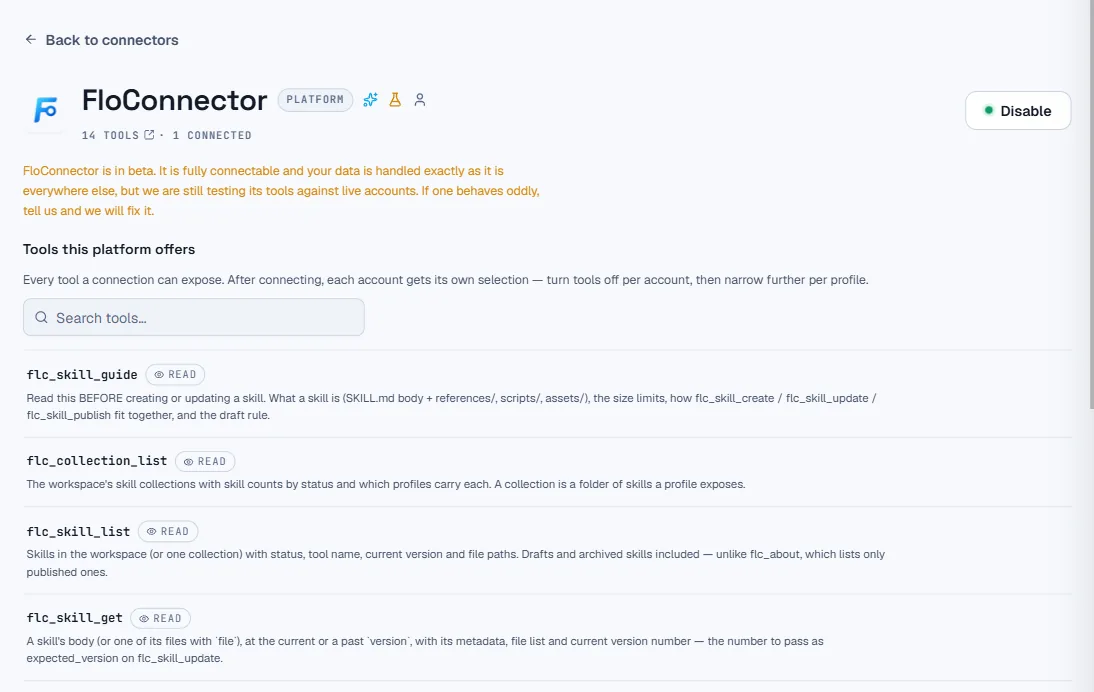
That page is not a special case built for this row. It is the connector detail page, rendering a connector, and the only branch in it is the wording: a page that says “we are still testing it against live FloConnector accounts” reads back on itself, so first-party rows get their own phrasing for the lede, the beta note and the FAQ.
Connecting it is a toggle. There is no OAuth, no popup, no vendor to redirect to and no credential anywhere: one POST, gated on the same connections.create permission as connecting anything else, and the row exists. Disconnecting is the ordinary path, and there is nothing on a vendor’s side to revoke.
The one deliberate difference
Here is the part worth reading twice.
On a Xero connection, everyone using that profile acts as whoever connected Xero. That is how brokered OAuth works everywhere, and it is fine: the connection carries one set of credentials and one set of vendor-side permissions, and the vendor cannot tell your bookkeeper from your office manager.
On this connector, everyone acts as themselves.
There is no credential to share, so the caller is resolved from the OAuth grant that the AI client is holding, and every tool checks the exact permission key its dashboard equivalent checks: skills.view to read, skills.author to write, skills.publish to publish, skills.manage for collections. Never inferred one from another. The permissions are resolved fresh on every single call, so a role that gets narrowed mid-session bites on the next tool call rather than the next reconnect.
That is what makes it safe on a profile several people share. Enabling it grants nobody anything beyond the role they already had in the dashboard. Someone with read-only access to Knowledge gets a connector that can read Knowledge, and the write tools are not in their list at all.
The fourteen
| Tool | What it does | Needs |
|---|---|---|
flc_skill_guide | How to write a skill here: the scaffold, the limits, the draft rule | skills.view |
flc_collection_list | Collections with skill counts and which profiles carry each | skills.view |
flc_skill_list | Skills with status, tool name, version and file paths | skills.view |
flc_skill_get | A body or one file, at the current or a past version | skills.view |
flc_skill_create | A new skill as a draft, body and files in one call | skills.author |
flc_skill_update | One revision: the body plus a file delta, together | skills.author |
flc_skill_publish | Draft to live, or live back to draft | skills.publish |
flc_skill_archive | Archive or unarchive. Reversible | skills.author |
flc_skill_history | Every revision: who, how it arrived, what it touched | skills.view |
flc_skill_restore | A past version back, as a new revision | skills.author |
flc_skill_copy | Duplicate into another collection as a draft | skills.author |
flc_skill_export | The skill as an Agent Skills bundle, ready to zip | skills.view |
flc_collection_create | A collection. Its slug becomes the tool prefix, permanently | skills.manage |
flc_collection_update | Rename, re-describe, re-mark, archive | skills.manage |
| 14 tools | 6 read, 8 write | 4 permission keys |
The guide is first in the list on purpose, and flc_skill_update’s own description points at it. It is rendered server-side from the live limits rather than written out as prose, so the numbers a model reads are the numbers the service will actually enforce. The dashboard downloads the same document.
One call is one revision
flc_skill_update takes the body and a file delta in a single call: only the paths you are changing, with content: null to delete one. Both land as a single history entry.
The alternative was a per-file tool family, and it produces a history nobody can read: eight revisions for one edit, seven of them meaningless on their own. If a model rewrites the body and swaps two reference files, that was one act of authorship and the record should say so.
Concurrency is handled the boring way. flc_skill_get hands back the current version number, flc_skill_update takes it as expected_version, and a stale one is refused. The refusal is the interesting bit: it comes back naming the revisions that landed in between, so the model can read what it missed and try again rather than guessing or clobbering.
Creating never publishes. flc_skill_create always produces a draft, and flc_skill_publish is a separate call behind a separate permission. A model can write ten skills in an afternoon and none of them are live in anyone’s client until a person with the publish right says so.
Results that state their non-effects
This is the thing that took the most iteration, and it came out of testing the connector live rather than from a design document.
A tool result has two channels, and clients disagree about which half they show the model. The fix was not to pick one. It was to make every result say what it did not do, in words, in both channels:
- Publishing into a collection that no profile carries says exactly that. It had been relaying “live”, which is true of the database and false of the world: the skill was published and nobody could reach it.
- A metadata-only update says it wrote no revision and that the note was not kept, rather than implying a version that does not exist.
- A stale
expected_versionlists the revisions since, as above. - A link in the body pointing at a file the skill does not have is flagged rather than silently shipped.
Two bugs turned up on the way, both worth naming because neither would have shown up in a unit test. The file-count cap was double-counting deletions, so swapping one file on a skill that already had twenty-five was refused. And the dangling-link check was swallowing a trailing full stop, which made it report a perfectly healthy link as broken.
What is deliberately not here
Three things, each for its own reason.
Permanent deletion. It needs the typed confirmation, and a typed confirmation is not a thing a tool call can meaningfully carry. Archiving is reversible and available; deleting stays in the dashboard.
Zip import. A model cannot reliably produce a zip. flc_skill_export covers the direction that does work, handing back a full Agent Skills bundle ready to write out and compress.
Attaching a collection to a profile. That is a different family with its own permissions, and it is phase two rather than an oversight.
Use it on its own profile
A profile carrying this connector is a high-privilege session, and it is worth treating it like one.
The recommended shape is a dedicated Knowledge profile rather than your everyday vendor one. A session that can both rewrite your instructions and call your accounting system is exactly the pairing you do not want, because a prompt injection that reaches the first has a use for the second. Two profiles costs nothing. It is not auto-enabled on anyone’s first profile for the same reason.
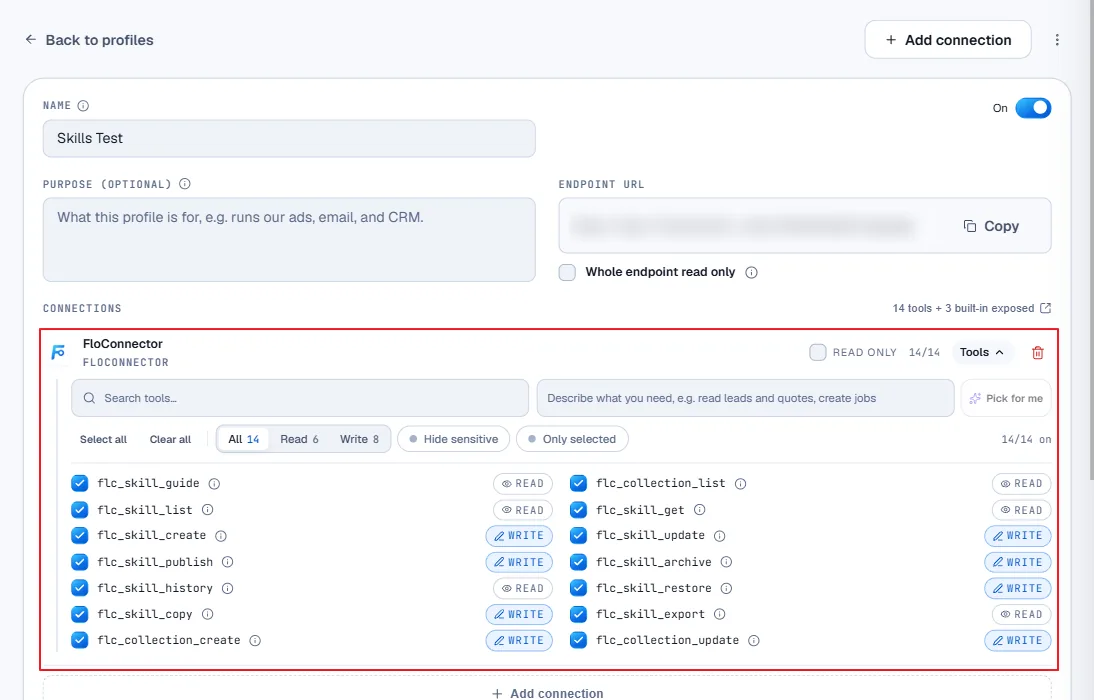
Two things in that panel are worth pointing at. Every tool has its own tick, so “can author” and “can publish” are not the only granularity available to you: a profile with only the six read tools is a perfectly good way to give someone’s AI client your written procedures and no ability to touch them. And Whole endpoint read only is the blunt version of the same idea, one checkbox that makes the write tools unreachable no matter what is ticked below it.
Note the 14 tools + 3 built-in exposed line, too. The three are flc_about, flc_load and flc_query, which are on every endpoint and were flc_-prefixed long before this connector existed. They resolve by exact name rather than by prefix, which is why fourteen flc_skill_* and flc_collection_* tools could join them without colliding.
What comes next
Nothing about this connector is skills-specific. It is FloConnector’s own control plane exposed as tools, and skills authoring is simply the first family that earned a place.
The obvious next one is activity: asking your AI client how much your workspace has been doing, which tools ran, where the calls went, without opening the dashboard to find out. Profile shaping is the other candidate. Both land as further tool families on the same connector, with their own permission keys, checked the same way on every call.
It is in beta today. The owner path has been walked end to end against a live endpoint, twice; the narrowed-role path rests on gates that fail closed and a smoke suite that asserts on the refusals. That is why it says beta rather than available, and it will move when a second person has walked it.
Turn it on from Knowledge → Build with AI, or from the connectors grid like anything else.
Keep reading
More from the blog
Xero MCP: 133 tools, and month-end is something you can ask for
Our Xero connector went from 53 tools to 133. It can now send the invoice, hand you the link your customer pays from, put an overpayment against the next invoice, record a twelve-invoice remittance as one payment, and read the reports your accountant opens. Here's what you can ask for now.
Connecting someone else's accounts to Claude, without their password
Every guide to MCP authentication assumes the person connecting the account is the person running the AI client. When you are doing the work for somebody else, they are not. This is the thing I could never solve properly in n8n, and what it took to solve it here.
Skills over MCP: where your instructions should actually live
An Agent Skill is a folder on somebody's laptop. Fine for one person, a quiet disaster for a team: four copies, three of them stale, no history and no way to take one back. Here is what changes when the folder becomes a hosted object served down the same connection as your tools.