
Skills over MCP: where your instructions should actually live
An Agent Skill is a folder on somebody's laptop. Fine for one person, a quiet disaster for a team: four copies, three of them stale, no history and no way to take one back. Here is what changes when the folder becomes a hosted object served down the same connection as your tools.

We argued a while back that “Skills or MCP” is the wrong question, because the two do different jobs: MCPs are verbs, Skills are playbooks, and any real system wants both. That post was about what a Skill is.
This one is about where it lives, which turns out to be the harder problem.
The four-copy problem
Here is how it actually goes. Someone writes a good skill. how-we-qualify-a-lead, say: the questions to ask, the fields that have to be filled, the two things that disqualify a lead immediately, the tone the follow-up should be written in. It works. It makes their AI noticeably better at a job the business does twenty times a week.
Then a colleague asks for it, and it gets zipped and sent.
That is the moment the skill stops being one thing. There are now two, and within a fortnight one of them has been edited. By the time the third person joins in there are four copies, three of them slightly wrong, and nobody can tell you which is which, when they diverged, or who changed the disqualification rule and why. There is no history, because a folder in a downloads directory does not have one. There is no way to fix it centrally, because there is no centre.
The format is not the problem. Agent Skills is a genuinely good specification: a SKILL.md carrying a name and a description, with references/, scripts/ and assets/ alongside it, loaded on demand rather than pinned into every conversation. Anthropic wrote it, OpenAI adopted it, and it is now the closest thing the agent ecosystem has to a portable unit of know-how.
But a specification for a directory says nothing about who owns it, which version is real, who may change it, or how a change reaches the four people already running the old one. Those are distribution questions, and a folder cannot answer any of them.
What a hosted skill has to be
Four properties. A local folder has none of them.
| Property | A folder on a laptop | A hosted collection |
|---|---|---|
| Addressable | N copies, one per machine | One row, one owner, one current version |
| Versioned | Whatever the file says today | Append-only history, full text of every revision |
| Permissioned | Anyone who was sent the file | Read, author and publish are separate rights |
| Targeted | Everyone who was sent the file | Per profile, like every other tool |
None of that is exotic. It is what source control does for code and what a CMS does for pages, and it is what nothing yet does for the instructions a business gives its AI. The reason it matters more here than it sounds is the last row: a skill is not a document somebody reads, it is a document a model acts on. A stale one does not sit there looking out of date. It quietly does the wrong thing, at speed, in three people’s sessions at once.
Why they arrive as tools
There is no native skills channel in MCP, and it is worth being precise about that, because people assume one is imminent.
SEP-2076, which would have added skills/list, skills/get and a list_changed notification, was closed in February 2026. The work moved to a resource-based delivery model that lives in an explicitly experimental incubation repository and is not in the current specification. So of the primitives that exist today:
- Resources are where the ecosystem is heading, but no client auto-injects them. A person has to attach one by hand. If the model never learns the skill exists, the skill does not exist.
- Prompts surface as slash commands: user-invoked, never model-invoked. A useful extra surface, not a delivery mechanism.
- Tools are the only primitive that is both universally supported and something the model can reach for on its own.
So a skill is served as a tool. One tool per skill, named skill_<collection>_<name>, where the tool’s description is the skill’s description and the tool’s return value is the skill body.
That is progressive disclosure implemented exactly, and the economics are the point. The description sits in the tool list costing about sixty tokens. The body, which might be four thousand words on how your quoting works, enters the context window only when the model decides it is relevant to what you just asked.
When the specification stabilises this becomes a second projection over the same rows and the tool shim goes away. The storage is deliberately shaped like a skill bundle for exactly that reason.
The collection is the unit
A collection is a named folder of skills, and it is what a profile attaches. Skills live inside one; there are no loose skills.
That reads like an implementation detail and it is actually the feature. FloConnector already scopes what an AI client can reach by profile: this endpoint sees Xero and the CRM, that one sees the field-service platform and nothing else. Collections plug into the same machinery. Marketing’s profile carries the marketing collection. The bookkeeper’s carries the finance one. The contractor’s carries neither and does not know they exist.
The prefix is also why the tool names look the way they do. Two collections will eventually both hold something called onboarding, so the collection is always in the name rather than added on collision, because collision-only prefixing would silently rename an existing tool the moment a second collection was attached. A tool name is a contract a client has already learned. It does not get to move.
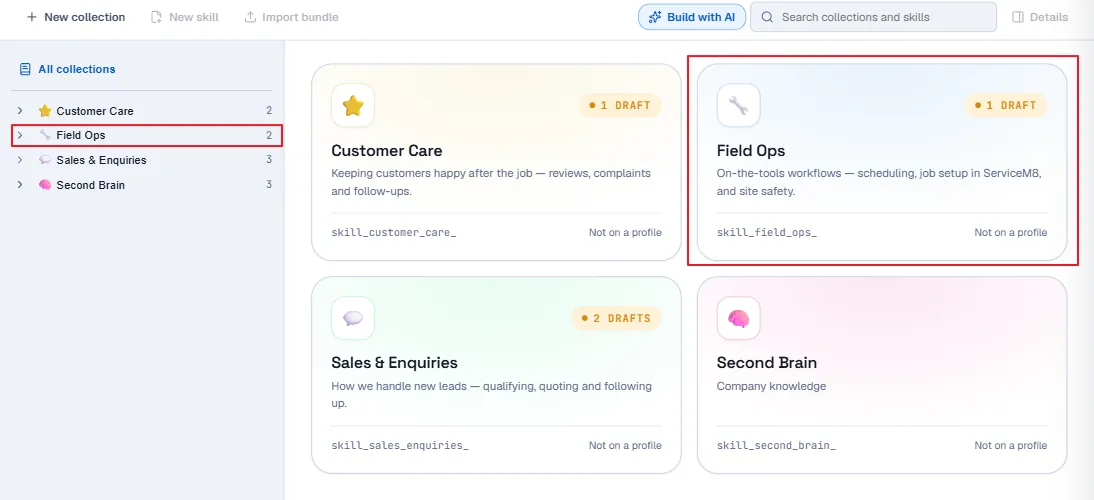
Note what every card says in its bottom corner: Not on a profile. Existing is not the same as reaching anyone. A collection nobody has attached is a folder, and the dashboard would rather tell you that than let you assume otherwise.
Inside a collection, a skill is a directory
Open a collection and you get its skills, each with the status and the exact tool name a client will see.
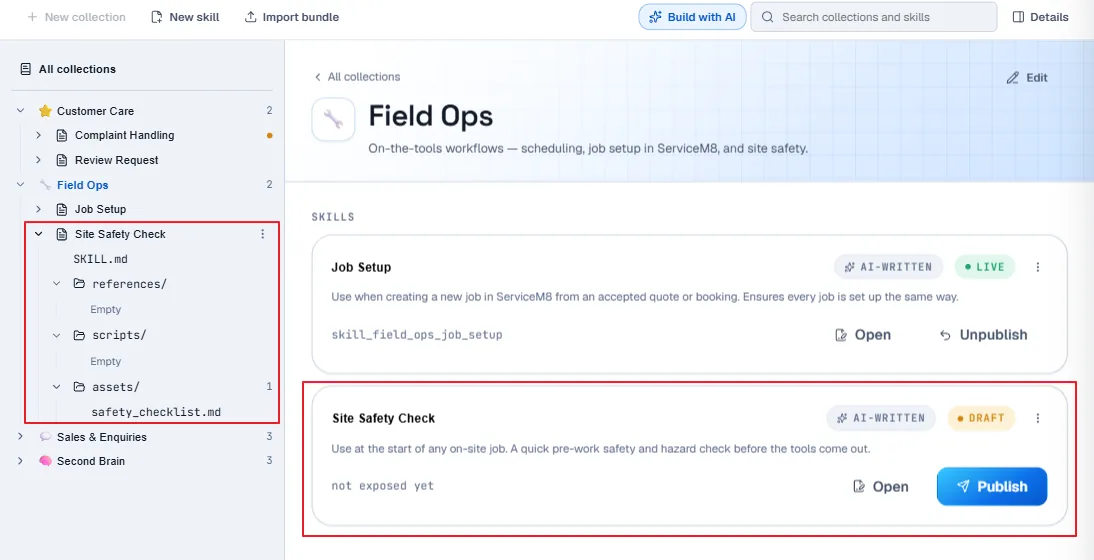
not exposed yet where a tool name would be, because that is exactly what a draft is.skill_field_ops_job_setup is live and reachable. The draft beneath it says not exposed yet in the place a tool name would go, which is the draft rule shown rather than explained.
The rail on the left is the part worth studying. A skill is not a string with some attachments bolted on: it is SKILL.md plus exactly three folders, references/, scripts/ and assets/, and those three are a closed set nobody can rename or add to.
Fixing that shape settles three questions at once. There is no nesting to model, because the specification says to keep file references one level deep, so depth is <folder>/<name> and there is no tree to design. Round-tripping becomes mechanical, because an imported bundle lands in the folders it came from and an export rebuilds the same directory with no mapping table. And the tool budget stays honest: these files are not skills and never become tools. Your tool count is a function of how many skills you wrote, never of how thoroughly you documented them.
Open a document and you edit it in place, with the cap in front of you.
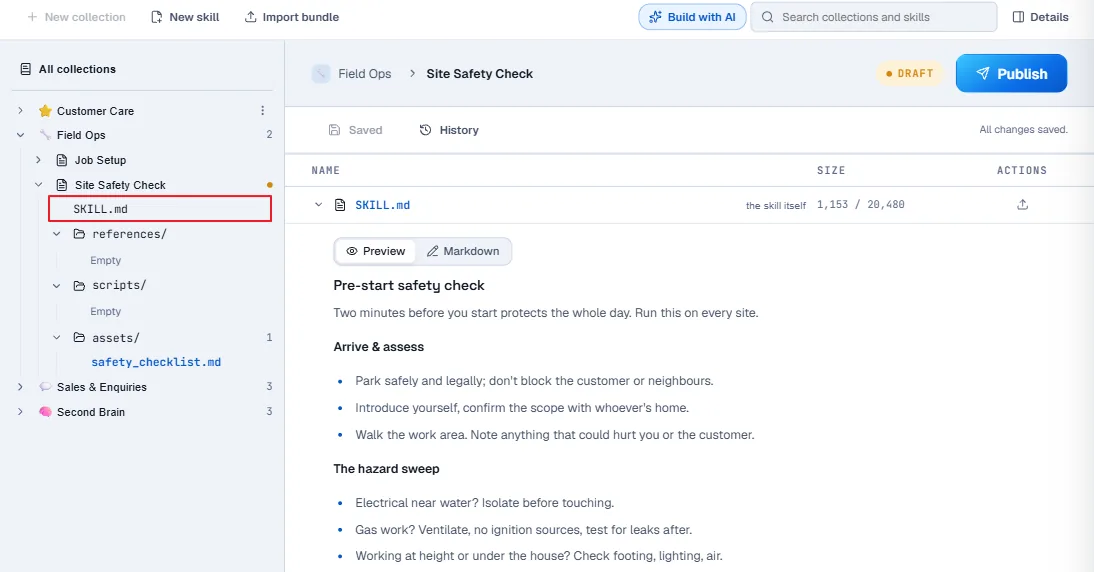
There is no edit page and no Edit button, because the mode toggle is the edit affordance and “open the file” stopped being a different journey from “change the file”. The number next to SKILL.md is that body measured against its cap, live, so a skill that is getting too long tells you before the database does.
What propagates instantly, and what does not
Worth being straight about, because half of this is better than people expect and half of it is not there yet.
Editing a skill’s body changes nothing about the tool list. Same name, same description, new text on the next call. Every connected client picks it up immediately: no reconnect, no notification, nothing for anyone to do. This is the common case and it is the one that matters. Fix the disqualification rule once at 9am and every AI in the business is following the new one at 9:01.
Adding, archiving or re-describing a skill changes the tool set, and a client that has already listed the tools will not notice until it lists them again. FloConnector does not emit notifications/tools/list_changed yet, so today that second case means reconnecting the client. It is the smaller half of the problem, and it is on the list.
History is the security story
Editing a skill changes what every connected client does on its next call, with no announcement. Put that plainly and it should sound alarming, because a skill is instructions a model follows: a bad edit is a supply-chain attack on your own agents.
A model cannot author through an attached collection at all. An attached collection is strictly read-only over MCP, which leaves the real vector as a human with dashboard access: either a bad actor, or far more likely an honest edit that went further than the person intended.
The mitigation is a record nobody can quietly rewrite. Every version is stored append-only with the complete text of the edit, not a byte count and a date, and every version records how it arrived: typed in the dashboard, imported from a bundle, restored from an earlier revision, or written by an AI client. Restoring a past version is itself a new revision rather than a rewind, so the history keeps everything, including the mistake. A history you cannot read is a rumour. This one you can read.
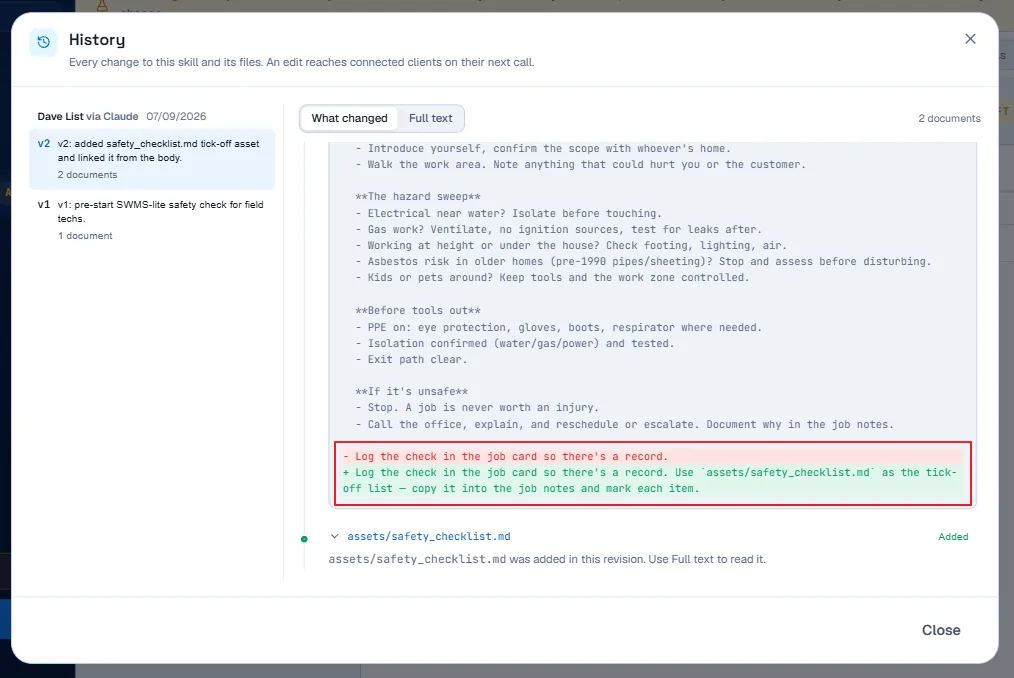
Two details in that dialog are the whole argument. The diff is a real diff, so you can see that v2 did not just add a file, it also rewrote one line of the body to point at it. And the attribution says “Dave List via Claude”: the record names the person and the client they were using, so an AI-written revision is never anonymous and never mistaken for a human-typed one.
Two structural defences sit alongside it. Creating a skill always produces a draft, for every author and every route, because a half-finished instruction set must not be live in everyone’s client while you go to lunch. And publishing is a separate permission from authoring, so the person who can write a skill is not automatically the person who can push it to the whole workspace.
Where the line is
FloConnector never executes a skill’s scripts. Customer-authored code is untrusted by definition, and running it server-side would make us a code-execution platform, which we have gone out of our way not to be. A skill may carry code as a file. We return the text; your client’s own sandbox runs it, or does not.
Skill loads are internal calls, logged at zero credits. You are not charged for reading your own instructions.
Bodies cap at 20KB, files at 32KB each, twenty-five files to a skill. The caps bound context cost and, honestly, force some hygiene. A skill that will not fit in 20KB is usually two skills.
And then you still have to write them
Everything above is plumbing, and plumbing was never the reason people stall. They stall because a dozen good skills is a dozen sittings in a text editor, and a text editor is not where anyone wants to spend Tuesday.
You can bring what you already have: a zip of Agent Skills bundles lands in the right folders and comes back out the same way, so moving in from claude.ai or from a repo is a drag and a drop.
The better route is that the AI client already open on your desk can write them for you, because FloConnector now exposes its own control plane as a connector. Fourteen tools: read the collections, draft a skill, revise it, publish it, read its history, put back a version you preferred. Same product surface as any other connector we build, pointed at ourselves.
That is what the AI-WRITTEN badges in the screenshots above are. Both of those skills were drafted from a chat rather than typed into the dashboard, they both landed as drafts because that is the only thing creation can produce, and the badge is the same provenance the history records.
That connector has its own post, including the part where it is the only one in the catalog on which everybody acts as themselves.
One honest note, which the dashboard makes before we do: Knowledge is in alpha. It works, and your data is handled exactly as it is everywhere else on the platform, but it is an early release and the way skills are structured may still change. The storage is deliberately shaped like the ecosystem’s own bundle format precisely so that if it does move, what you have written moves with it.
Keep reading
More from the blog
Xero MCP: 133 tools, and month-end is something you can ask for
Our Xero connector went from 53 tools to 133. It can now send the invoice, hand you the link your customer pays from, put an overpayment against the next invoice, record a twelve-invoice remittance as one payment, and read the reports your accountant opens. Here's what you can ask for now.
Connecting someone else's accounts to Claude, without their password
Every guide to MCP authentication assumes the person connecting the account is the person running the AI client. When you are doing the work for somebody else, they are not. This is the thing I could never solve properly in n8n, and what it took to solve it here.
The FloConnector connector: 14 tools, and one deliberate difference
We build connectors to other people's platforms. This one points at ours: fourteen tools that let your AI client write, revise and publish the skills your workspace runs on. It is an ordinary catalog row in every respect but one, and that one is the interesting part.