













We're live in beta — earn up to 12,000 credits by signing up today. Get started

Case study

Elite Access Solutions

Barry Minton, owner

  • Scaffolding hire
  • South East Queensland
  • Founded 2020

One AI connection across the fourteen tools he already ran, shared with the people who work for him.

14 tools connected 17 connections, one workspace
6 profiles shared with his team each one a different subset
None quotes retyped by hand since 28 July

The business

Big clients. Big ambition.

Elite Access Solutions hires scaffolding to commercial builders, strata managers and high-end residential builders across the Gold Coast, Brisbane and the Sunshine Coast. The crew is small. The clients are not. The job is to deliver what a much bigger contractor would, with a team that still gets home at night.

Founded
2020, Ormeau on the Gold Coast
Work
Commercial, remedial and residential scaffolding, swing stages, public access stairs
Clients
Commercial builders, strata managers, prestige residential sites
Team
A small crew, and one owner doing the scheduling, the site managers and the quoting
AI client
Claude, on the desktop and on his phone
eliteaccesssolutions.com.au

Before

Fourteen tools, and nothing joining them up.

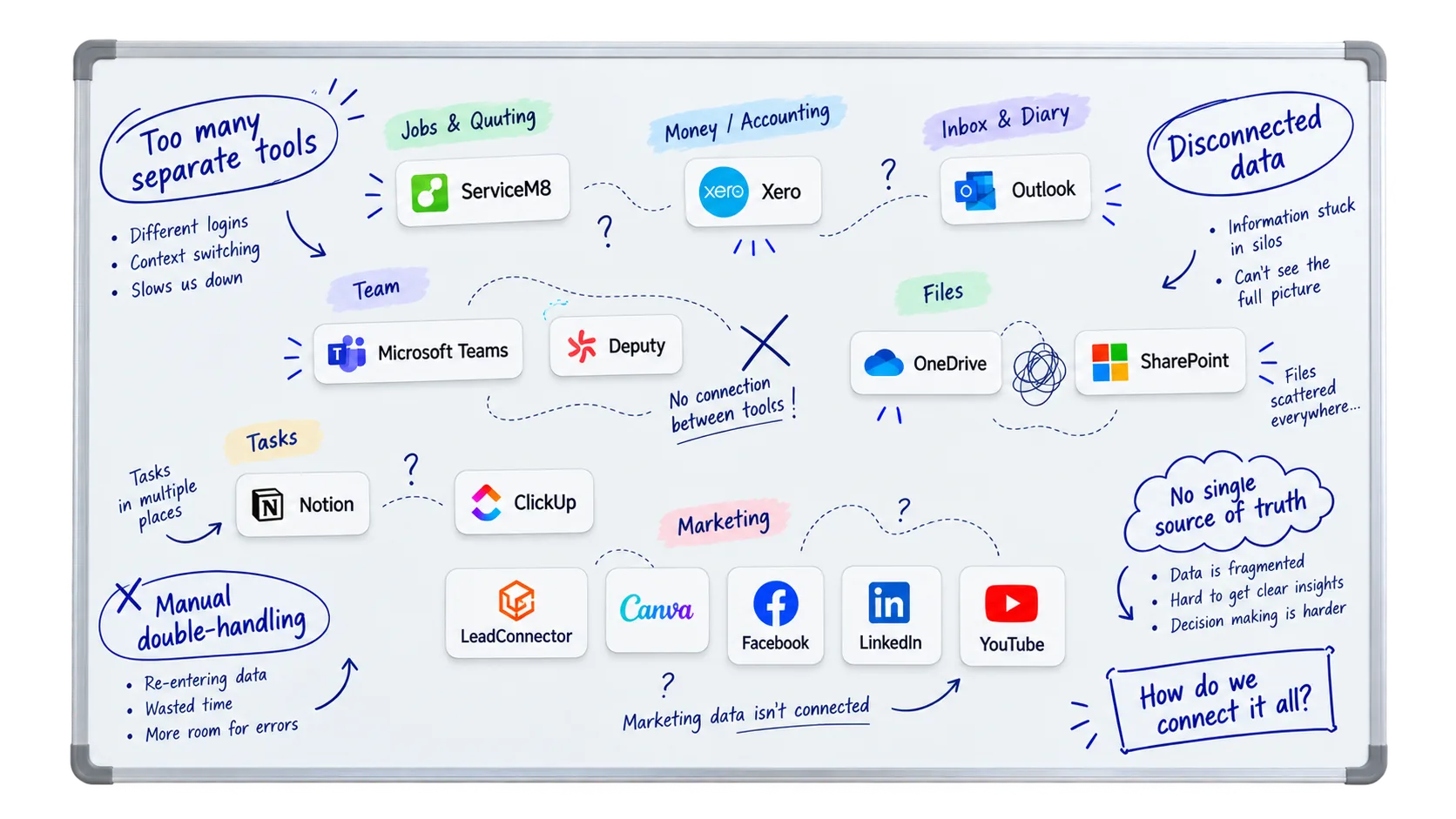
A whiteboard sketch of the fourteen tools the business ran, drawn as separate cards grouped as jobs and quoting, money, inbox and diary, team, files, tasks and marketing, with dashed lines and question marks between them. Handwritten around the edges: too many separate tools, with different logins, context switching and slows us down; disconnected data, with information stuck in silos and can't see the full picture; manual double-handling, with re-entering data, wasted time and more room for errors; no single source of truth, with data is fragmented, hard to get clear insights and decision making is harder; and at the bottom, how do we connect it all?
14 tools · 7 jobs 0 connections between them
  1. Too many separate tools

    Fourteen logins and constant context switching. Every job starts with finding the right tab.

  2. Manual double-handling

    The same data typed in twice. Slower every time, and more room for error.

  3. No single source of truth

    Information stuck in silos. Nobody can see the full picture.

The switch

One connection to everything he already ran.

FloConnector sits between the AI he was already using and the fourteen tools the business already had. Nothing was replaced and nothing was migrated. Each tool was connected once, and every profile he hands out decides which of them a person can reach.

I've not bounced into something that it couldn't do.
Barry Minton
6 profiles Barry Owner Claude desktop and phone Outlook OneDrive ServiceM8 Notion Microsoft Teams LeadConnector Xero ClickUp SharePoint Deputy Canva Facebook LinkedIn YouTube 6 profiles Barry Owner Claude desktop and phone

Barry · Claude · 14 connectors. Every line is a real connection in the workspace.

Job one

First, the contacts.

Less than an hour after connecting, the first job was the CRM. The assistant read back through the inbox for everyone who had emailed the business, checked each name against what GoHighLevel already held, and wrote the gaps in. Thirty-three minutes later the marketing list existed. Once ServiceM8 was connected, its client list was read the same way.

  • Read the inbox 92 pages deep for the people who weren't in the CRM yet.
  • Checked each one against the contacts GoHighLevel already had, so nothing was created twice.
  • Updated 16 contacts, added a note and removed 2 duplicates. Four of the twenty writes came back with an error and were left for him.
Start your own clean-up
Outlook
92
ServiceM8
210
GoHighLevel
32
tool calls
334
first run
33 minutes

First run 28 July 2026, the afternoon he connected. ServiceM8 joined on 2 August.

On a schedule

Then the routine went on a timer.

Claude has scheduled tasks, and ChatGPT now does too. Barry pointed one at his FloConnector profile. Every morning it reads the inbox, the diary and the overdue invoices, works out who he needs to get back to, and emails him the brief before he opens a laptop. When he is away, his team runs the same sweep on his inbox.

It tells me how many overdue invoices are in my Xero and then tells me who I should call.
Barry Minton
  1. 7:10 am Every morning

    morning_brief

    “What happened yesterday, what did I miss, and who do I need to get back to?”

    Claude FloConnector Outlook Xero ServiceM8 A brief, emailed before he opens a laptop
  2. 12:00 pm While he is away

    inbox_cover

    “What is sitting in Barry's inbox this morning that someone needs to pick up?”

    Claude FloConnector Outlook Handled by his admin, from her own profile
  3. 2:00 pm Every afternoon

    afternoon_sweep

    “Anything that came in since this morning that needs a call or a reply, with a brief of what was said.”

    Claude FloConnector Outlook Microsoft Teams A Teams message to whoever owns it

From the car

A quote from a voice note, written into the job.

The same quoting assistant, now connected. He takes a measurement off a map, drops the screenshot in, answers a few questions about the configuration, and the line items land in the ServiceM8 job. Then he tells it to move the job to the drafting queue and tag the drafter. From the car, by voice.

  1. 1 Find the job the quote belongs to servicem8_list_jobs 224 calls
  2. 2 Write the line items into the bundle servicem8_create_job_material 175 calls
  3. 3 Correct a line servicem8_update_job_material 118 calls
  4. 4 Move the job to the drafting queue servicem8_update_job 112 calls
  5. 5 Tag the drafter on the job servicem8_create_note 111 calls
Barry Minton On a call, 8 September 2026
All I could do was manually take that data and punch it into ServiceM8 myself. That's gone. Like, that's gone gone.
0:32

Like, the quoting genie was there, but it was inside Claude and it couldn't really do anything. And all I could do was manually take that data and punch it into ServiceM8 myself. That's gone. Like, that's gone gone. The time that it saves me, and I can do stuff literally. And I carried it over to my phone, so I can be driving now up to Brisbane for a site inspection and I can just be going through my morning brief, literally giving it the verbal context through Whisper Flow. And it's punching out quotes inside ServiceM8 for me.

The bigger unlock

Then he gave it to his team.

Six profiles, each a different subset of the fourteen tools. Pick a person to see what they can reach.

Elite Access Solutions workspace · 14 connectors
The people · 5
  • EA Agent 1 person ServiceM8 Outlook Notion Microsoft Teams OneDrive LeadConnector Xero His executive assistant. Everything, from the desk or the car.
  • Daily Brief 2 people Outlook ServiceM8 OneDrive Xero LeadConnector Microsoft Teams The 07:10 brief and the afternoon sweep.
  • Brain 2 people OneDrive ClickUp The task board and the files behind it.
  • CFO 2 people Xero Outlook Overdue invoices and who to chase.
  • Field 5 people ServiceM8 Jobs and forms in ServiceM8, from the site.
  • EAS Admin Profile 3 people Outlook ServiceM8 Xero OneDrive SharePoint Microsoft Teams The inbox and the files, for whoever is covering.
Barry Owner
  • 6 of 6 profiles
  • 9 connectors in reach

Barry reaches every profile in the workspace. Whatever the six of them can do, he can ask for, from whichever AI client he has open, at a desk or in the car.

From any AI client Claude ChatGPT Mistral

On Trustpilot

In his words, in public.

Rated 5 out of 5

Game changing

The ability that this platform allows me to connect the tools from my existing software into my business and run AI layer of intelligence across it, and then to be able to share and manage those connections through my team is absolutely fantastic and one of a kind.

Elite Access Solutions Barry Minton Elite Access Solutions · 31 July 2026
Trustpilot Read it there

What actually changed

The admin left the desk. He went back to site.

None of this replaced anybody. Barry still prices the job, still decides who to call, still signs off the quote. What changed is where the work happens and who else can see it, which is what put the hours back into his week.

  • Runs without him The morning brief, the afternoon sweep and the quoting run on their own, at a desk nobody has to sit at.
  • Their own logins His admin covers the inbox. The crew update jobs from the site. Nobody was handed a password.
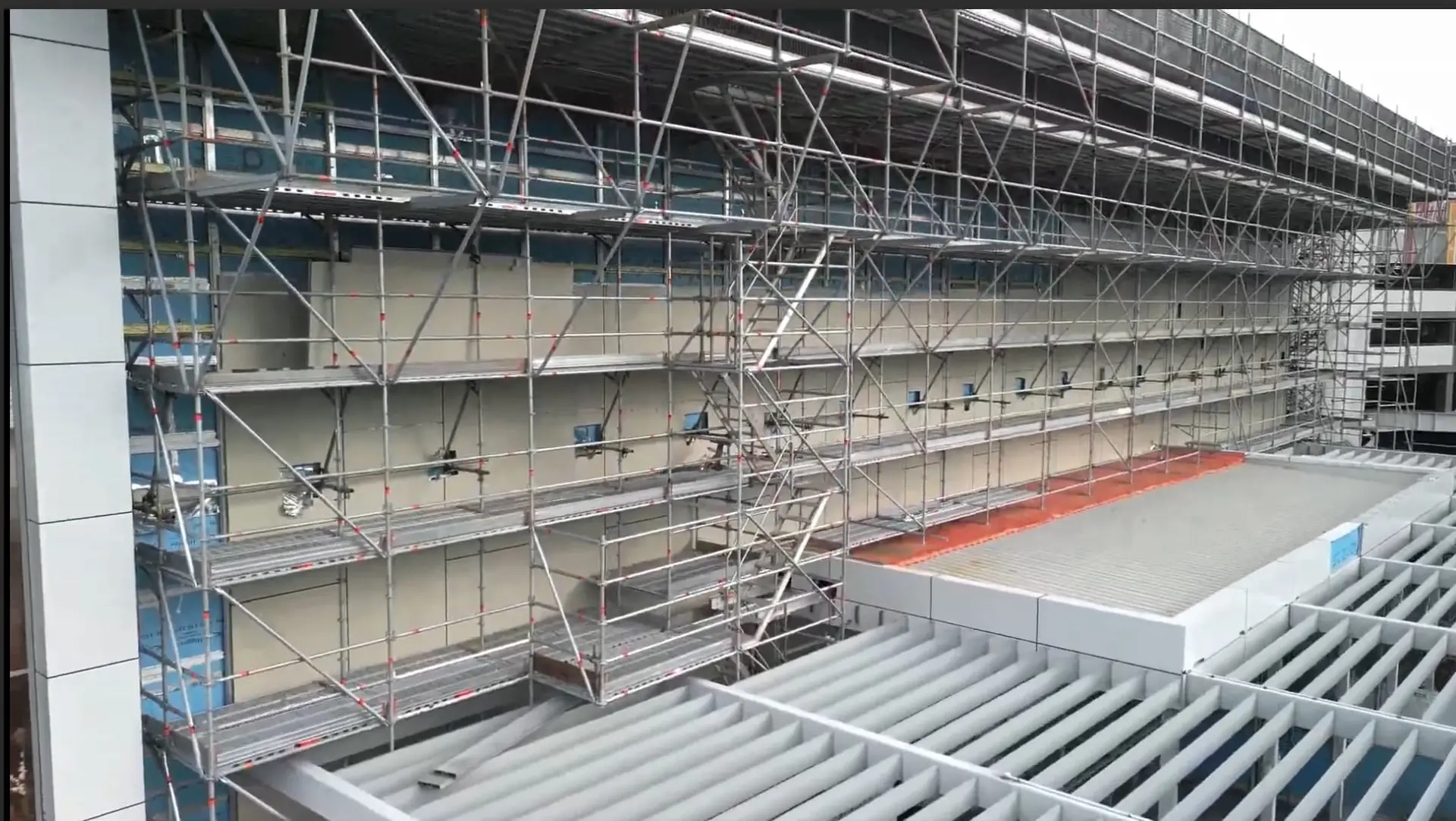
  • Back on site Which leaves him where this was filmed: on the scaffold, with the people who build it.

The figures on this page are readings from the metered call log, taken on 13 September 2026. They are not projections and they are not rounded up.

Culture matters on a scaffold crew Barry: Mate, it's good having boys like you with the right sort of attitude. What does working at Elite mean to you, and what's the best part about working here? Scaffolder: I love that we're all family. You're not just, you know, sometimes another number in another company. Barry: Yeah, it's an important part for us to make you guys feel welcome, man. So I'm glad that's actually not just me talking [censored]. Scaffolder: And there's always a good individual relationship you have with the person, no matter who you go and talk to. It's not just that you know them because you work for them. Barry: Yeah, culture's important, man. We talk about it all the time: a [censored] attitude is not something we want to encourage through here. So it's good to have you as part of the team, mate. Thanks for your help getting this one built. Elite Access Solutions on Facebook, 27 May 2026

What the workspace runs on

All 14, reachable from one AI client.

Questions

Is this a real workspace?

Yes. It is Barry's account, and he agreed to the page. The call figures and the way the profiles are used were read from the production log on 13 September 2026. Some names and profile names have been changed to protect him and his team, who are shown as roles rather than named.

What is a profile?

A profile is a connection with its own tools and its own people. You choose which connectors and which tools it carries, assign the people who can use it, and each of them signs in with their own login. Taking someone off it is one toggle, and no credentials ever change hands.

Does his team need their own accounts?

They need a login, which is free, and a seat on a profile. The workspace owner pays for the workspace; the people on it see only the profiles they have been assigned.

Which AI clients does this work with?

Any client that can connect to an MCP server over HTTP: Claude on the desktop, the web and the phone, ChatGPT, Mistral and others. Barry runs Claude. Scheduled tasks in Claude and ChatGPT can point at a profile as well, which is how the morning brief runs.

Could I set this up for my own business?

Yes. Connect the tools you already run, make a profile per job, and hand each one to the people who do that job. The free plan includes 1,000 tool calls, which is enough to find out what your own first week looks like.

Your turn

Your stack is probably already on the list.

Over 50 connectors, profiles for your team, and a metered log like this one. Start free with 1,000 tool calls and see what your own first week looks like.