












We're live in beta. Earn up to 12,000 credits by signing up today. Get started

Case study

The Scaffold Group

Sarah Doiron, co-owner

  • Scaffold rental and installation
  • British Columbia, Canada
  • BCCSA COR certified

Seven tools behind one AI connection, a sweep that keeps the job schedule current, and a slice of it for each person who needs one.

7 tools connected 13 connections, six of them mailboxes
6 schedule sweeps a day at 58 past the hour, 4 to 9 pm
3 people, each on their own login six profiles between them

The call

Sarah walks through it.

The whole call, 26 minutes: the schedule, the hourly sweep, the skills behind it, and how she decides who on her team can reach what.

The business

Built for serious projects.

The Scaffold Group rents and installs scaffolding for commercial and industrial work across British Columbia: engineered access, temporary roofs and enclosures, and the shutdowns where one incident stops a site. Sarah runs the office side of the business; her co-owner is the one on the phone with clients and sites. Three months ago she had a choice between hiring someone and going all in on AI. She chose AI.

Based
British Columbia, Canada
Work
Scaffold rental and installation, engineered access, temporary roofs and enclosures
Sectors
Commercial and industrial, including shutdowns and complex access
Recent job
Johnston Street Bridge, Quesnel: a two-phase temporary roof, so coating carried on through winter
Certified
BCCSA COR certified, CCAB member
AI client
Claude on the desktop, with Claude in Chrome
thescaffoldgroup.com

Before

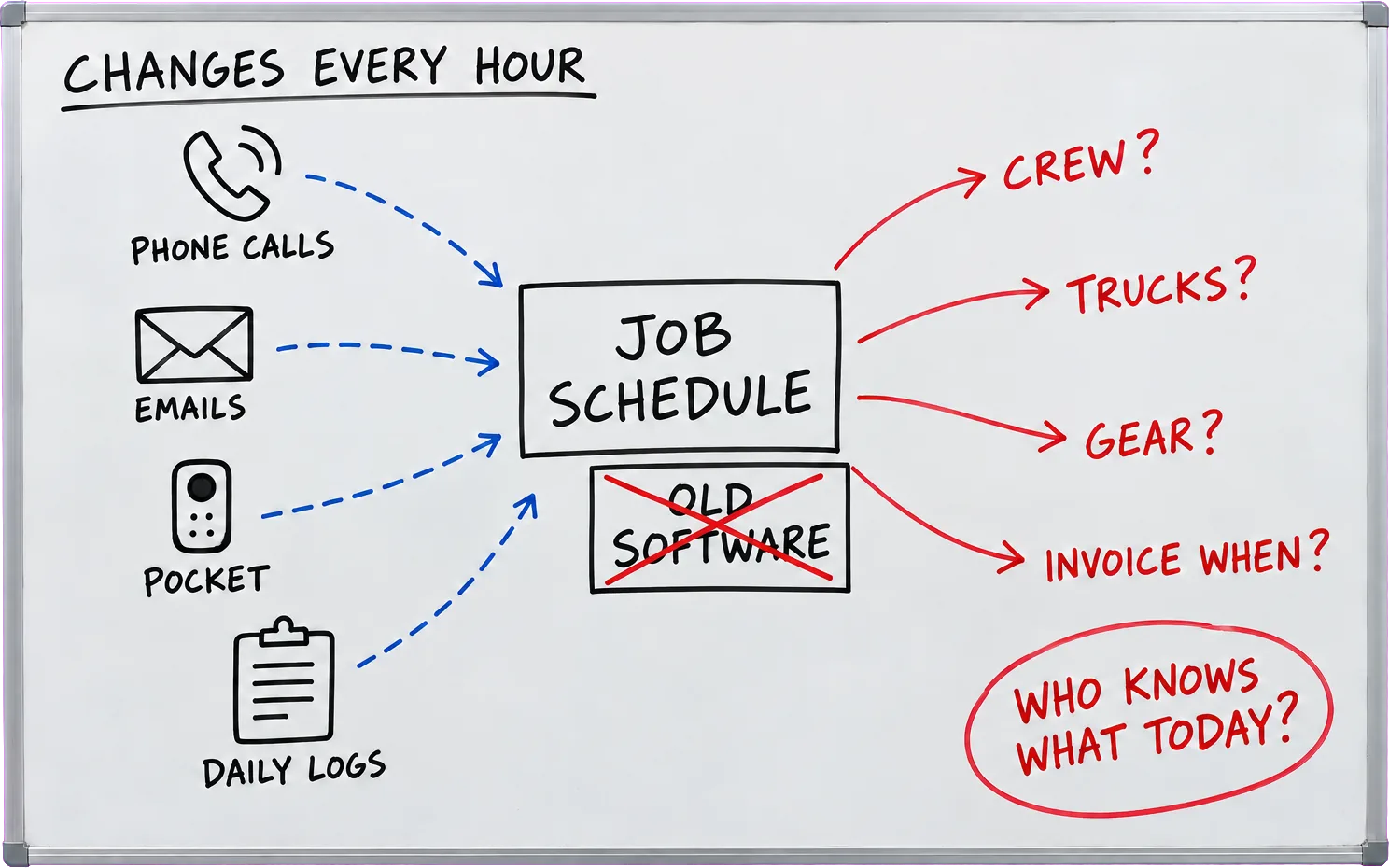
A schedule that changed by the hour, and nobody could see it.

A whiteboard sketch. Top left, underlined: changes every hour. Down the left, phone calls, emails, Pocket and daily logs, each with a dashed blue arrow into a box in the middle labelled job schedule, with a box under it reading old software, crossed out in red. From the schedule, red arrows run out to crew?, trucks?, gear? and invoice when?. Bottom right, circled in red: who knows what today?
  1. Moved on the phone

    Dates were renegotiated on calls. Yesterday's schedule was not today's.

  2. Nobody could plan around it

    Crews, orientations, trucking and gear all hung off a schedule nobody trusted.

  3. Invoicing by guesswork

    Without sight of which jobs were running, it was hard to know when to invoice.

The switch

From telling her what was wrong to fixing it.

Sarah had been using Claude for months. It was good at finding problems and could not do anything about them: Claude's built-in Xero connector could read, and that was all. FloConnector put the seven tools the business already ran behind one Claude connector, including the mailboxes of the people who handle bookings and accounts, and both owners' Pocket recorders in a single profile.

I can get it to tell me there's something wrong in Xero, but I just now want it to go fix it in Xero.
Sarah Doiron
6 profiles Sarah Co-owner Claude desktop, with Claude in Chrome Connecteam Outlook Pocket Xero SharePoint LeadConnector Google Drive 6 profiles Sarah Co-owner Claude desktop, with Claude in Chrome

Sarah · Claude · 7 connectors. Every line is a real connection in the workspace.

Job one

The accounting inbox, into Xero.

The first thing she handed over was the job she came in with. A scheduled run reads the accounting inbox for remittances, bills and requests, matches each one to the contact and the invoice in Xero, and records the payment or raises the invoice. The email is forwarded to whoever owns it, or filed.

  • Reads the accounting inbox for remittances, bills and requests.
  • Matches each one to the contact and the invoice in Xero before it writes anything.
  • Records the payment or raises the invoice, then forwards or files the email.
Connect your own books
Accounting inbox
822
Xero
1,278
tool calls
2,100
days with Xero writes
32 days

30 July to 29 October 2026, read off the log on 30 October.

Claude scheduled tasks

The office runs on a timer now.

Sarah's office runs on Claude scheduled tasks (ChatGPT has them now too). Each one points at a Claude skill rather than a list of instructions, so changing how a task works is one conversation with Claude and the task itself never changes. The log shows three rhythms a day.

The way I set this up, so I can fix things or change things or evolve them quickly, is I always set up a skill.
Sarah Doiron
  1. 5:00 am Before the morning huddle

    morning_catch_up

    “What changed since yesterday afternoon? Bring the schedule up to date before the huddle.”

    Claude FloConnector Connecteam Pocket SharePoint A schedule that is current when the team sits down
  2. 7:00 am Every morning

    accounting_inbox

    “What came into the accounting inbox overnight, and what needs doing in Xero?”

    Claude FloConnector Outlook Xero Payments recorded, emails filed, replies drafted
  3. 3:58 pm Every hour, 4 to 9 pm

    job_schedule_sweep

    “Check every source and update the job schedule and the master task list.”

    Claude FloConnector Connecteam Outlook Pocket Visits moved to match what was said and logged

Every hour

A schedule that keeps itself up to date.

Dates used to move on phone calls, and the schedule found out last. Now the sweep reads the crew's Connecteam daily logs and time clocks, the bookings inbox, and the calls on the owners' Pocket AI recorders, works out which visits changed, and moves them. The schedule is a sheet the team reads live; everything the sweep reads to fill it comes through FloConnector.

  1. 1 Read the crew's daily logs: what got done, what is left connecteam_list_form_submissions 1,060 calls
  2. 2 See who clocked in, and on which job connecteam_list_time_activities 353 calls
  3. 3 Match each log to its job connecteam_list_jobs 177 calls
  4. 4 Find the calls since the last sweep pocket_sarah_list_recordings 321 calls
  5. 5 Read what was agreed on them pocket_sarah_get_summary 250 calls
Sarah Doiron On a call, 29 October 2026
Fifteen minutes ago it did a sweep, and the schedule is so up to date. It is awesome.
0:29

Essentially every hour, it scans our team's meetings, our emails and our Pocket devices, which are our recording devices for our phones. And it takes all that information and makes the changes to the schedule itself. And so now you can see, we're talking now at 1:10, fifteen minutes ago it did a sweep, and the schedule is so up to date. It is awesome.

Who reaches what

Tight where the money is.

Six profiles, each a different slice of the seven tools. Finance is the tightest: two people. Pick a person to see what they can reach.

As a small business owner, this is the thing you're most worried about.
Sarah Doiron
The Scaffold Group workspace · 7 connectors
The people · 4
  • Finance 2 people Outlook Xero The books and the accounting inbox. Two people.
  • Project Management 3 people Connecteam Outlook SharePoint The schedule sweep: daily logs, time clocks, the bookings inbox.
  • Sales 3 people LeadConnector Outlook Leads and the CRM.
  • SharePoint, no delete 1 person SharePoint Full access to the file shares, with delete switched off.
  • Payroll 1 person Outlook The payroll inbox, and nobody else's.
  • PocketAI 3 people Pocket Both owners' recorders, in one connection.
Sarah Co-owner
  • 6 of 6 profiles
  • 6 connectors in reach

Sarah reaches every profile: the books, the schedule, sales, the file shares, payroll and both Pocket recorders. The scheduled tasks run from her Claude, on her profiles.

From any AI client Claude ChatGPT Mistral

On Trustpilot

In Sarah's words, in public.

Rated 5 out of 5

The missing piece that makes Claude actually work

I've been dabbling with Claude for about six months but kept hitting a wall. I couldn't connect it to my actual systems, so I could never get enough out of it. FloConnector changed that completely.
Sarah Doiron The Scaffold Group · 31 July 2026

Trustpilot Read it there

What's next

Taking herself out of the bottleneck.

None of this replaced anybody. It is what let the business put off a hire and keep its overhead low while it grows. Her next project is called Next Level, and it takes the same idea into every process she still has to touch herself.

  • Runs without her The morning catch-up, the accounting inbox and six sweeps a day run on their own.
  • Fixed in fifteen minutes Every task points at a skill. When something is not right, she tells Claude, and the skill changes.
  • Their own logins Her co-owner and operations reach their own slice. Nobody shares a password, and Finance stays at two.

The figures on this page are readings from the metered call log, taken on 30 October 2026. They are not projections and they are not rounded up.

It's focusing on removing myself as the bottleneck. Because it can happen now.
Sarah Doiron Co-owner, The Scaffold Group

What the workspace runs on

All 7, reachable from one AI client.

Questions

Is this a real workspace?

Yes. It is Sarah's account, and she recorded the call this page quotes. The figures and the way the profiles are used were read from the production log on 30 October 2026. The people who work with her are shown as roles rather than names, and one profile name is shortened.

What is a profile?

A profile is a connection with its own tools and its own people. You choose which connectors and which tools it carries, assign the people who can use it, and each of them signs in with their own login. Taking someone off it is one toggle, and no credentials ever change hands.

Can one profile reach two people's Pocket recorders?

Yes. A connector can hold more than one account, so both owners' recorders sit in one connection and one profile. A connector built into an AI client usually reaches one account, and only your own.

How do Claude scheduled tasks reach her tools?

A scheduled task in Claude runs a prompt on a timer with the connectors that Claude account has added. Sarah's FloConnector profiles are added as Claude connectors, so the 05:00 catch-up, the 07:00 accounting run and the hourly sweep each reach the tools on their profile and nothing else.

Does she write code?

No. The schedule page is a sheet and a small web page that Claude built, and with Claude in Chrome it did the setting up too. She pressed the buttons it asked her to press.

Which AI clients does this work with?

Any client that can connect to an MCP server over HTTP: Claude on the desktop, the web and the phone, ChatGPT, Mistral and others. Sarah runs Claude. Scheduled tasks in Claude and ChatGPT can point at a profile as well, which is how the sweeps run.

Could I set this up for my own business?

Yes. Connect the tools you already run, make a profile per job, and hand each one to the people who do that job. The free plan gives you 1,500 tool calls, which is enough to find out what your own first week looks like.

Your turn

Your stack is probably already on the list.

Over 50 connectors, profiles for your team, and a metered log like this one. Start free with 1,500 tool calls and see what your own first week looks like.