We're live in beta — earn up to 12,000 credits by signing up today. Get started

Setup guide

How to connect Stripe to Claude

Ask Claude what happened in Stripe this month and get it from the account itself, without exporting a report or handing over a key.

426 Tools available
203 Read only
223 Can change data
~5 min Setup time

Before you start

Claude already has a Stripe connector

Stripe's own connector is in the directory, verified, and it covers payment processing. This page's route is a different shape: the whole Stripe tool list behind one endpoint, with you choosing which of it Claude can touch.

Stripe Verified

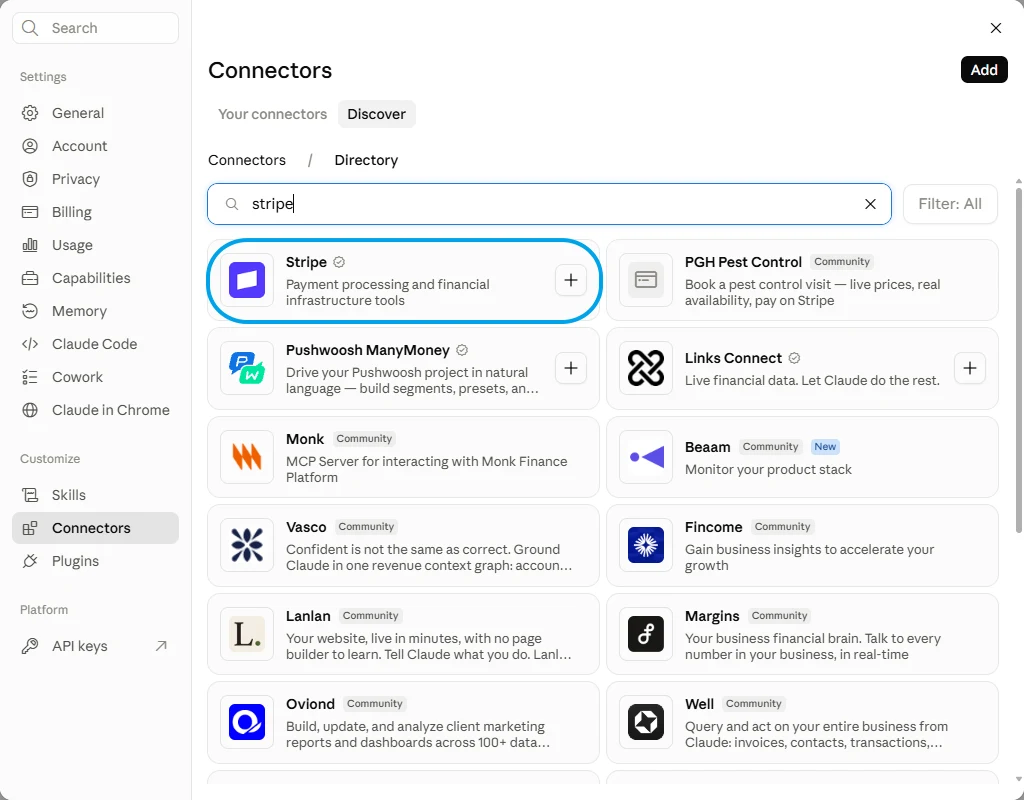
11 tools Claude's connector directory with Stripe searched, showing the verified Stripe entry above a column of community ones.
In Claude: the plus icon, then Connectors, then Manage connectors. Open Discover and search for Stripe.

Versus

Connect FloConnector in five minutes

Connecting FloConnector connects Stripe, and Stripe is one of 60 connectors the same endpoint can carry. You do this setup once, not once per app.

  • Stripe tools, not one workflow The listing above does the job its vendor shipped it to do. A profile reaches all of them, and you switch on the handful you actually use.
  • One endpoint, not one app Stripe is one of 60 connectors a single profile can carry, so Claude answers across your stack rather than one app at a time.
  • You decide what it can change Reading and writing are separate switches. Leave the writes off and the connection cannot alter a record, however the question is put to it.

Step one

Connect Stripe

  1. Sign in to FloConnector and open Connectors, then choose Stripe.
  2. Choose Connect. Stripe's own authorisation page opens and asks which account to connect, then returns you to the dashboard.
  3. Open a profile, or create one, and switch on the Stripe tools you want available. This is the step that decides whether Claude can issue a refund or only look at one.
  4. Copy the profile's endpoint URL. That is the only thing you paste into Claude, and it carries exactly the tools on that profile and nothing else in the account.

Step two

Add the endpoint in Claude

  1. In Claude, open Settings, then Connectors.
  2. Choose Add custom connector.
  3. Give it a name you will recognise, such as your workspace name, and paste your profile endpoint as the URL.
  4. Save, then choose Connect. Claude opens the FloConnector sign-in page.
  5. Sign in with the email on your FloConnector account and approve access. Claude loads the profile's tools.
Full Claude walkthrough, with screenshots

Control

Build the profile, then hand over the URL

A profile carries only the tools you switch on, and the endpoint exposes only that profile. That is the whole permission model, and it is set before anyone connects.

/stripe-marketing Preview
Stripe Connected 12/426

8 read 4 write

Tick a row to include it, or flip Read only to lock every write off at once.

FloConnector holds the Stripe credential, encrypted before it is stored, and calls Stripe on the model's behalf. Claude sees the tools and their results, never the credential behind them.

Once it is connected

What to ask Claude

Each of these runs real Stripe tools, named underneath so you can see what Claude is actually calling. 12 of the 426 tools are covered here.

How much did we take last month, and how does that compare with the month before?

Both months totalled from the payments that actually succeeded, with the fees separated out so the net is the figure that reached your balance.

  • list_charges
  • list_balance_transactions

Which customers are past due, and how much revenue is sitting behind them?

Every subscription Stripe has marked past due, the invoice that failed on each, and the recurring total they add up to.

  • list_subscriptions
  • search_invoices
  • search_customers

Refund Grace Okafor's last payment and tell me what it costs us.

The refund issued against that charge, plus the processing fee, which Stripe keeps when a payment is handed back.

  • search_customers
  • list_charges
  • create_refund

Do we have any open disputes, and when is the evidence due?

Each open dispute with its reason code, amount and evidence deadline, alongside the charge it was raised against.

  • list_disputes
  • list_charges

Set up a payment link for the new onboarding package, billed monthly.

A product, a recurring price and a shareable link, made in that order because Stripe will not hang a price on a product that does not exist yet.

  • list_products
  • create_product
  • create_price
  • create_payment_link

When is our next payout and what is in it?

The pending payout with its expected arrival date, and the charges, refunds and fees that add up to the amount.


  • list_payouts
  • list_balance_transactions

Troubleshooting

When Claude does not behave

  • Claude Desktop sits on Connect after you signed in

    The sign-in has usually succeeded. Check the profile in your dashboard: if the grant is there the connection is live, and restarting the desktop app clears the stale button. It is a client-side issue, not something the server can fix.

  • The connector saves but no tools appear

    Disconnect and reconnect it once. If it is still empty, check in the dashboard that the connection behind the profile is still connected and that you are an assigned member of that profile.

  • The first load is slow on a very large profile

    A profile exposing hundreds of tools takes longer to load, and a model given too many tools chooses worse. Split the work across two profiles rather than exposing everything at once. This is the failure mode most MCP write-ups name and never solve.

Questions, answered

Does Claude see my Stripe keys?

No. You authorise on Stripe's own page, and the token that comes back is encrypted before FloConnector stores it. Claude sees the tools and what they return, never the credential behind them.

Can Claude refund a customer on its own?

Only if the refund tool is on the profile. It is one switch, separate from everything that reads, so a profile built for reporting cannot return a payment however the question is phrased.

Is this safe to point at the live account rather than test mode?

That is what it is for, and the control is the profile. Start with reads only, check the activity log to see exactly which tools ran, then add the writes you want. Stripe keeps its own record of every API call as well, filed under the connected application.

Do I need to host anything?

No. The MCP server is FloConnector's and it is already running. Claude connects to a URL over HTTPS, so there is no package to install and nothing that has to be awake on your laptop for a report to work.

Can support issue refunds without seeing the books?

Yes, and this is the reason profiles exist. A support profile can carry the customer lookup and the refund tool and nothing else, while finance gets its own profile and its own URL. People are assigned to profiles one by one.

We use ChatGPT as well. Do we set it up twice?

The endpoint does not change. A profile URL is a standard hosted MCP server, so the same one serves both; only the menu you paste it into is different.

One Stripe account per connection

A connection authorises one Stripe account and a workspace holds one connection. Separate accounts for separate brands or countries means a workspace each, with its own endpoint, which is worth deciding before you build the profiles.

The toolkit mirrors the whole Stripe API

Stripe's surface is vast and the toolkit follows it, so there are several near-identical tools for the same job and a few that can change where your payouts land. Switch on the handful you use. A model handed all of them picks worse ones, and an unused tool that can edit an external account is not something you want sitting on a profile.

Card numbers are not there to read

Stripe returns the brand and the last four digits of a card and nothing beyond that, to anyone, through any tool. Claude can see that a payment failed and on which card; it cannot see the card. That is Stripe's design rather than a setting you can relax.

Your turn

Put Stripe in front of Claude.

One connection, one endpoint, and 426 Stripe tools your AI can actually run. Start free with 1,000 tool calls and see what your own first week looks like.