
Connecting someone else's accounts to Claude, without their password
Every guide to MCP authentication assumes the person connecting the account is the person running the AI client. When you are doing the work for somebody else, they are not. This is the thing I could never solve properly in n8n, and what it took to solve it here.

Back when I was building client automations in n8n, the workflow was never the hard part. The hard part was the same twenty minutes at the start of every build, and it went like this.
I would have the whole thing mapped out. I knew which systems had to talk to which and roughly what the logic was. Then I would get to the bit where I needed the client’s accounting login, their scheduling system, their inbox, and there was no good way to ask for any of it. So I would send an email saying “can you add me as a user”, wait three days, get added with the wrong permissions, ask again. Or someone would just reply with the password in plain text, and I would sit there looking at it knowing it was now in my sent items forever.
The other option was booking a call and screen sharing while they clicked. That works exactly once. It does not survive the tenth client.
What I wanted, every time, was to send one link that said: here are the six things I need from you, click each one, I never see any of it. That did not exist, so I did the email dance for years.
So that is what a connect link is
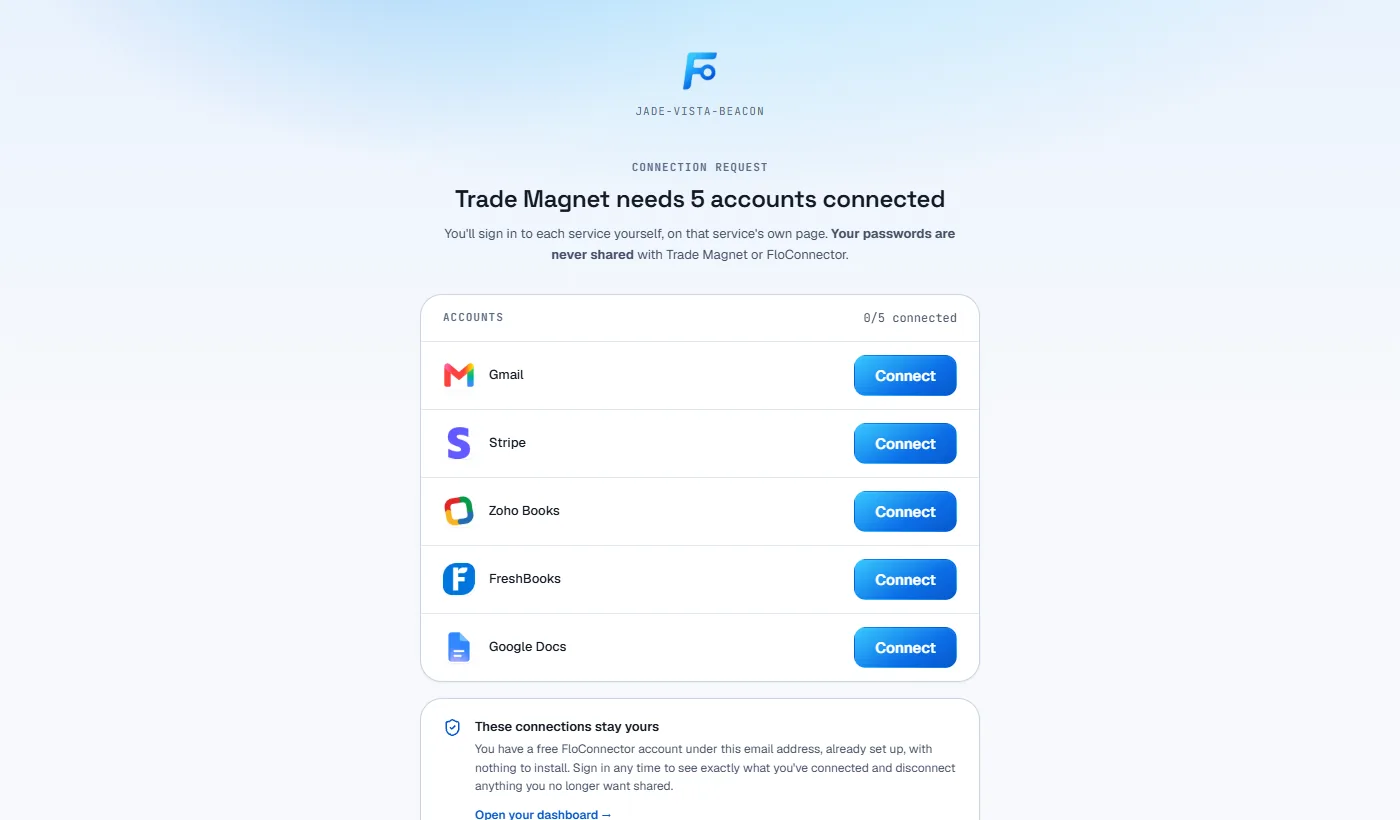
You pick a person and the connections you need from them. They get one link. They open it, sign in to each service on that service’s own page, and the connections land in your workspace attributed to them.
You never hold a credential of theirs at any point, and not because we are careful with them. Because there is no point in the sequence where one is in your hands.
The consent happens on the vendor’s page, not on ours
Worth being precise here, because “we never see your password” is a sentence anyone can type.
Your recipient opens the link and gets a checklist, one row per connection you asked for. For most platforms, clicking a row does not open a form on our site asking for their login. It redirects to that vendor’s own OAuth consent screen, on that vendor’s own domain, served by that vendor. They authenticate to Xero at Xero, to Google at Google, to their CRM at their CRM. The screen asking for the password is the one they already know, at the address they already trust, and we are not in the middle of it.
What comes back is not a password. It is an OAuth token, scoped to whatever that consent screen listed, which we envelope-encrypt before it is written down. The credential architecture behind that is its own piece, and the short version is that the database never holds a usable credential and the AI client never holds one either.
The part I actually care about is the part before all of it. Whoever composed the link never had anything to hand over. No password in an email, no shared vault entry, no note in a project tool that somebody finds in two years.
Not every platform does OAuth, and that nearly broke it
Here is the bit I got wrong, and it is worth admitting because the fix is the interesting part.
I built this for OAuth, which covers most of the catalog and felt like the whole job. It is not the whole job. Plenty of platforms do not do OAuth at all. Field service and job management software in particular tends to issue an API key you generate inside your own account, and self-hosted software has no vendor to redirect to in the first place.
Which meant the platforms a connect link refused were AroFlo, Ascora, Fergus, Simpro, Connecteam, WordPress. Look at that list. Those are exactly the systems where the client holds the credential and you are the one who needs it connected. The connectors most likely to need a link were the only ones that could not have one. An OAuth-only version of this fails at its own use case, which is an annoying thing to find out after you have built it.
So a row can now ask for two other things. A platform whose credential is a key asks the recipient to mint one in its own admin and paste it, and it goes straight into the vault and is never shown to anyone again. A self-hosted platform asks for the address of their own server, then sends them to that server’s authorize screen, which is their own software asking their own permission.
What does not change across the three is the only thing being claimed. The credential is created at the far end, by the person it belongs to, and the sender is not in the path.
I will be straight about the trade. A pasted key is a slightly worse ask than a redirect, because the recipient is typing a secret into a page rather than being handed to a screen they recognise. It is a much better ask than the thing it replaces, which was emailing it to me.
A link in an inbox is only one factor
A tokenized URL is a bearer credential. Anyone holding it is holding it, and inboxes get forwarded, shared, screenshotted and breached. So the link is not the only thing the page checks.
The URL proves you hold the link. An email gate proves it was meant for you: the recipient types the address it was sent to, and only then does the page load anything. Until that passes, the server does not echo the recipient’s address back, does not name the workspace, and does not list the platforms. A stranger who finds the URL sees an auto-generated link name and a box asking for an email address, which tells them nothing they did not already know.
That is a deliberately modest bar and I am not going to dress it up as two-factor authentication. It is the difference between a leaked URL being an incident and a leaked URL being a dead end for anyone who does not already know who it was addressed to.
The link does not move once you have sent it
This one came out of a real bug, and it is the kind that stays invisible until it bites.
The token used to rotate on every send. Sounds like good hygiene, right up until you see what it does to the actual workflow: you send someone a link asking for three connections, they connect two, you realise you forgot a fourth, you add it and send again, and the URL sitting in their inbox is now dead. The improvement broke the thing it was protecting.
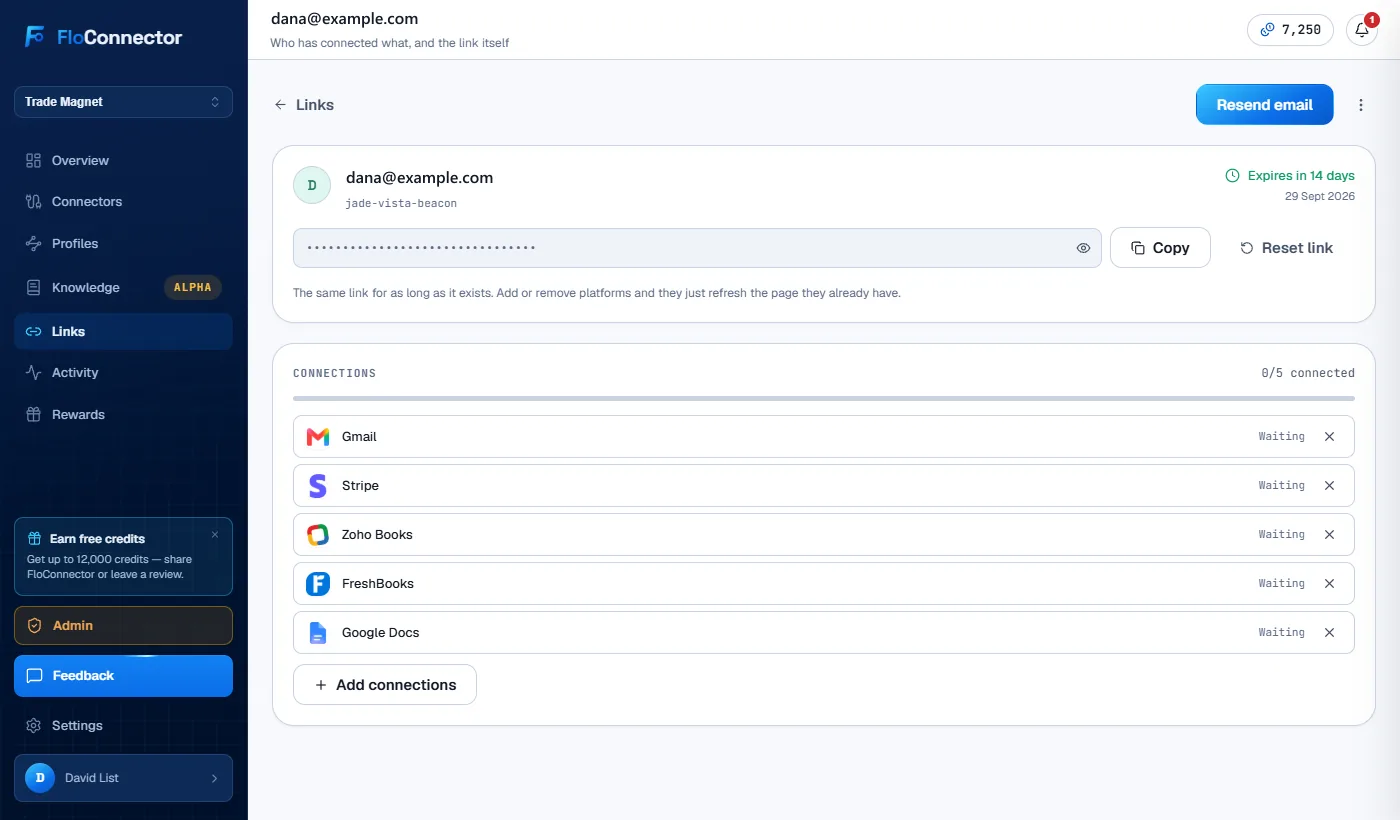
So the token is minted once and held sealed, which means it is encrypted at rest and can still be shown back to you when you want to paste it into a message yourself. Adding a platform to somebody’s list does not invalidate the link they already have. Rotation happens in exactly two places, both deliberate: an explicit Reset, and reactivating a link that was revoked, because a URL you killed should never come back by being switched on again.
There is also one link per person per workspace. Send to an address that already has one and it appends to their list rather than minting a second. A person has one standing connect page, not an archaeology of four links from four different weeks.
Expiry is a decision, measured in hours
The first version expired every link after 24 hours, silently, with no way to change it. Which is why most of them expired.
Twenty-four hours is a guess about someone else’s week and it is usually wrong. A client who opens your email on Friday afternoon and thinks “I’ll do that Monday” has already missed it. Now you pick, per send: one hour, a day, a week, a fortnight, thirty days, or never. Default is a fortnight, which survives a holiday.
The one-hour option is there for one situation, and it is the one no interface measuring in days can express: you are on the phone to them right now and you want the link to be worthless by the time the call ends.
Never exists too, and choosing it costs you typing the word unlimited into a confirmation, because a link with no expiry is a real decision and should feel like one.
What you can see afterwards, and what you cannot
The link stays on the Links page with its state on it: how many connections have been made, which are outstanding, when it expires. That status view is what makes this usable at ten clients instead of one, and it is genuinely all you get. You can see that they connected their accounting system. You cannot see how they signed into it.
Every connection is attributed to the person who made it, which is the record you want the first time somebody leaves and you need to know what walked out with them. And it runs both ways: the recipient can disconnect any of it themselves, whenever they like, without asking you. A connection somebody cannot withdraw is not consent, it is a credential they happened to type once.
One consequence worth saying plainly, because it explains a rule that otherwise looks arbitrary. A connect link adds its recipient to your account. They become a member of it, which is what makes those connections theirs rather than anonymous. That is why sending a link is an admin-level action even though viewing the page is not. Anyone who can add a person to your account is doing an administrative thing, whatever the button says.
I nearly did not build this
I went back and forth on it, honestly. It is unglamorous. It is not a connector, it does not add a tool, and nobody has ever picked a product because of its invite flow.
What changed my mind is that it is the natural next step for anyone doing this work on behalf of someone else. If you are an agency, or an ops person looking after more than one business, the connectors are not the constraint. Getting access is the constraint. That was true for me in n8n and it is true here, and no amount of good tooling downstream fixes an onboarding step that runs on chasing people over email.
So: you can send a client a link, ask them to connect their own systems, and never touch a credential doing it. That is the whole feature. It is the one I wanted for years.
Connect links are on Pro and above, on every workspace, with no cap on how many you send. The plan comparison has the rest, and the connector directory is what you can ask someone to connect.
Keep reading
More from the blog
ServiceM8 add-ons, built from a chat
ServiceM8's own AI add-on kit needs a computer, Node and a terminal. The ServiceM8 Add-on Builder needs a chat. Describe the add-on in Claude or ChatGPT, click through it on a sample job before it exists, point at what to change, and put it live in ServiceM8 when you say so. Free on every plan.
Tables: give Claude a database, not just a memory
Claude's memory carries the context of your past chats. It was never built to keep records. Tables are structured records your AI creates, fills from the tools you already use and reads back in any chat after, with typed fields, a key that stops duplicates, and every row editable in your dashboard.
Pylon + AI: 25 tools, and the signed quote stops being retyped
Pylon runs on a connector we build and maintain ourselves, with 25 tools across projects, designs, quotes, hardware prices, materials and STCs. The quote a customer signs can now be read line by line, priced off your own catalogue, and checked against what the proposal actually said.