
MCP Apps: fifty connectors, one widget
MCP Apps is the first official extension to the Model Context Protocol: a server can now render its own interface inside the conversation. Here's why a platform sitting in front of 50+ vendors should build exactly one of them, which one we picked, and what the protocol taught us on the way.

Ask an AI assistant about your business data and you get a paragraph back. Ask it for last month’s invoices and you get a description of last month’s invoices, or a wall of JSON, and anything you want to check yourself means asking again and waiting again.
That changed this week. Query results now arrive in FloConnector as a real table, rendered inside the conversation, that you can sort and filter yourself.
It is our first MCP App, it is in beta, and it is one widget. Deciding it should only be one widget took considerably longer than building it.
What it looks like
You ask a question. Instead of prose, you get this.
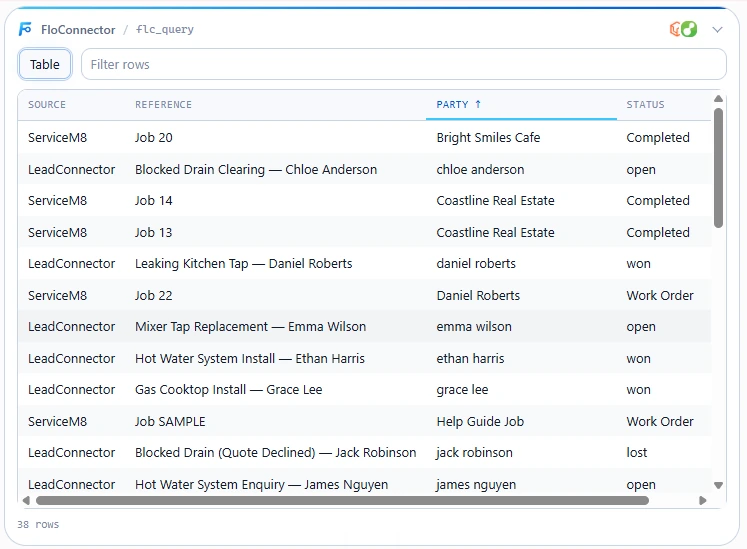
Click a column heading, it sorts. Type in the filter box, it narrows. Neither of those involves the assistant, so neither costs you anything or makes you wait. Then, once you have narrowed hundreds of rows to the three you care about, you can just ask about those three.
The rest of this post is why that is harder than it looks when you sit in front of 50+ different vendors, and what we learned building it.
What MCP Apps actually is
On 26 January 2026 the Model Context Protocol got its first official extension. (New to MCP? Start here.) Until then, a tool could return text, and that was it. MCP Apps lets a server ship its own interface alongside the text, so a result can be something you look at rather than something you read.
The mechanics are pleasantly small. A server declares a UI resource under a ui:// URI: an HTML document with its JavaScript bundled in. A tool points at it with one metadata field, _meta.ui.resourceUri. When the model calls that tool, the client fetches the resource, renders it in a sandboxed iframe, and pushes the tool’s result into it. From there the iframe and the client talk over JSON-RPC on postMessage, using the same protocol vocabulary as everything else in MCP.
The security posture is deliberately boring: templates are declared up front so a host can review them, messages are auditable, and the host enforces a Content Security Policy the server declares, defaulting to default-src 'none' if the server declares nothing. For a platform brokering other people’s business data, boring is the correct ambition.
It is also an unusual piece of standards work. Anthropic and OpenAI wrote it together with the creators of the community mcp-ui project, Ido Salomon and Liad Yosef, whose work it is largely built on. Two companies competing head-on over assistants agreed on one way to do this rather than shipping two incompatible ones, and the people who had already solved it in the open got to define the standard. That is not how this usually goes.
If you want the story from the people who built it, their MCP Dev Summit keynote is the best hour on the subject: MCP UI: Extending the frontier. It is a far better introduction than the spec, and it makes clear how early all of this still is.
Today it renders in Claude on web, desktop and mobile, in ChatGPT, in Goose, and in VS Code.
The aggregator’s problem
Here is where it stops being simple for us specifically.
FloConnector is a proxy in front of 50+ vendor APIs: Xero, QuickBooks, ServiceM8, Deputy, Shopify, LeadConnector, Simpro, and so on down the catalogue. A customer plugs one endpoint into Claude and reaches whichever of those they have connected.
MCP Apps says: render anything you like. Which sounds like a gift, until you count.
Every vendor returns a different shape. A Xero invoice is not a ServiceM8 job is not a Deputy timesheet is not a Shopify order. If the answer to “should this have a UI?” is “yes, per payload”, the work is one hand-built component per meaningful response shape, across 50-odd vendors, forever, with a maintenance tail every time one of them changes a field. That is not a feature. It is a second product, and one we would permanently be behind on.
There is also a much better-resourced competitor for that job: the client itself. Claude’s own generative UI already renders arbitrary structured data respectably and improves every month without us lifting a finger. Competing on the long tail of vendor payloads means spending our scarcest resource to produce something slightly worse than free.
So the rule we landed on is:
Build UI for the shapes we define, not the shapes vendors define.
Almost everything flowing through FloConnector is a vendor’s shape. Almost.
Why flc_query
Last month I wrote about why we run SQL instead of a code sandbox. Short version: vendor APIs list and filter, they do not aggregate, so when a question needs arithmetic across 48,000 rows, those rows have to go somewhere other than the model’s context window. Ours go into a temporary in-memory analytics workspace. flc_load stages the result of a tool call into it and returns a count. flc_query runs SQL against that and returns the answer.
That design turned out to have a property I did not appreciate until MCP Apps landed. flc_query’s output shape is uniform across the entire catalogue, by construction. It is columns and rows. It is columns and rows whether the data came from Xero or ServiceM8 or both at once, because by the time it reaches the query engine it has been flattened into tables.
One widget covers 50+ connectors. Not through cleverness, but because we had already been forced to normalise the shape for completely unrelated reasons.
It renders three ways: a table for detail or anything past two columns, a bar chart to compare one measure across up to 40 labelled categories, and a number for a single-value answer, because “what did we bill last month” deserves to be a figure rather than a one-cell grid.
The second door
Sorting a table is not interesting on its own. This is.
The entire point of the query engine is that raw rows never enter the model’s context. But that protection had a side effect we had quietly accepted for months: the model was the only door. If 48,000 rows sit in a workspace the model can query and you cannot see, you only ever get the model’s description of your data. You ask, it summarises, you ask again to check something, you wait again. The data is right there and you are reading a book report about it.
The widget is a second door. It runs in your client and reads the result directly, so rows travel from the workspace to your screen without passing through the model at all.
So sorting is free. Filtering is free. Not “cheap”, free: no tokens, no round trip, no waiting for a model to answer again. You narrow 500 rows to 3 by typing in a box, exactly as you would in a spreadsheet, and the assistant is not involved because it does not need to be.
Then you ask about those three.
What actually crosses back
This is the part I want to be precise about, because it would be easy to oversell.
When you filter or sort, the widget publishes a short note into the model’s context. It does not send the rows. It sends how many rows you are looking at out of how many, the filter text along with its exact equivalent as a SQL predicate, the sort column and direction, the query behind the original result, and an instruction to re-run flc_query with that predicate if it needs the specific rows.
So the model learns what you narrowed to, described precisely enough to reproduce it, rather than receiving the data. If it does need those rows it goes and gets them through the same gate as always, with the same protections. It is debounced, so typing a filter character by character publishes once when you stop, and it publishes nothing at all when you have not narrowed or sorted anything, because in that case the model already knows what the result was.
At the desk, the effect is that you filter to two overdue invoices and ask “why are these overdue”, and it works, with nothing copied back into the chat. Underneath, we handed over a WHERE clause. I like this shape a great deal: it removes the thing that made the architecture feel restrictive without giving up the property the whole architecture exists to protect. The same instinct as never letting the model see a vendor credential, applied to data instead of secrets.
The one thing no vendor’s own UI can do
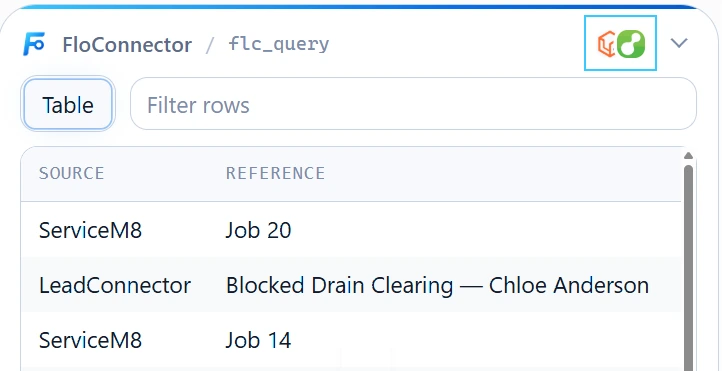
Every result names the connected apps behind it, with their icons, in the widget’s header.
That is decoration when there is one. It is the entire point when there are two. A single analytics session can hold tables staged from several vendors, so one question can join QuickBooks invoices to ServiceM8 jobs, and the table you get back is drawn from both with both marks on it.
No vendor’s own dashboard can render that, for the obvious reason that no vendor has the other’s data. It is the clearest thing we have shipped that only makes sense coming from an aggregator, and it is the same argument as giving one assistant access to the whole business: the value is in the join, not in any single connector.
Notes for people building on this
Building against a six-month-old standard is mostly pleasant and occasionally sharp. Five things, in case they save someone a day.
The tool-to-UI binding is static and singular. _meta.ui.resourceUri lives on the tool definition, it is one string, and a tool result cannot swap it. A server cannot pick a template per call and the model cannot pick one either. Our workaround is that view is an ordinary enum argument on the tool: the model sets it like any other input and the widget reads it. Being a plain argument turns out better than a protocol feature would have been, because we can steer it with a description and tune that against real usage.
We only advertise view to clients that can render it. An argument nobody can act on is pure token cost on every tools/list for every client that will never draw a pixel. The capability is right there in the handshake, so we branch on it. Same discipline as not shipping tools nobody asked for.
Do not assume structuredContent is private to the widget. The intuitive reading is that content is for the model and structuredContent is for the UI. That is not reliably true: some hosts, particularly coding agents, surface structuredContent to the model in preference to the text, and if you assumed otherwise you are paying for every payload twice. We measured it on our actual targets instead of trusting the intuition, and anything genuinely widget-only rides on _meta, the one channel that was private on every host we tested.
Declaring an empty CSP has consequences you should want. We declare no connect, resource or frame origins at all, so the bundle is entirely self-contained and safe to render anywhere. That means connector icons cannot be fetched, so they ride inlined as data URIs for the one or two connectors actually in play, rather than bundling all 64 at build time for icons mostly unused. About 5KB each, on _meta, where a base64 image will never reach a model’s context and waste real money.
The two big hosts want opposite things on an identical protocol.
Worth knowing before you conclude a correct fix did not work. ChatGPT identifies a widget by MIME type and ignores anything that does not match, and it takes its snapshot when the connector is first registered, so some changes need the connector removed and re-added rather than refreshed.
There is a sixth, more of a warning than a note. Attaching a widget re-categorises the tool in Claude’s permission UI. flc_query is annotated read-only, but the moment it gained UI metadata Claude moved it out of “Read-only tools” into a separate “Interactive tools” group with its own approval control: the UI metadata outranks the read-only annotation for grouping. Attach a shared widget to twenty tools at once and you have pulled twenty tools out of a bucket your customer already blanket-approved into one they have not, which reads to them as your server asking for new permissions. Roll out by group, not all at once.
Everything still degrades
The plain text result is unchanged on every path. No bundle built, or a client that does not support the extension, and the endpoint behaves exactly as it did last week.
That is not politeness, it is necessary. We do not control which client a customer plugs in, and a connector platform whose output quality depends on the customer having chosen the fashionable assistant is a connector platform with a support problem. MCP Apps is progressive enhancement here and will stay that way.
Where this goes
This is a first iteration of something six months old, and we are learning its shape in public. The interesting question is not “what else can we draw”, it is “what else do we own that is worth drawing”.
The candidates are the other surfaces we define rather than pass through. When a multi-step write partially fails, the harness returns a structured ledger of what completed, what failed and what to do next, and that wants to be a control surface rather than a display one: retry buttons, not a table. Write confirmations are schema-driven and could be a real form shown before anything is sent. Both are ours, both are uniform across every connector, and both are worse as prose.
What we will not do is chase per-vendor cards. The client’s own generative UI covers that long tail for free and improves without us. Our edge was never going to be drawing a nicer invoice than Xero can draw. It is being the only thing in the room that can put Xero and ServiceM8 in the same table.
MCP is early, and this extension is early inside it. We would rather be early with one widget that is genuinely right than broad and generic. If you are building on MCP Apps and hit any of the above, I would like to hear about it.
Keep reading
More from the blog
Connecting someone else's accounts to Claude, without their password
Every guide to MCP authentication assumes the person connecting the account is the person running the AI client. When you are doing the work for somebody else, they are not. This is the thing I could never solve properly in n8n, and what it took to solve it here.
The FloConnector connector: 14 tools, and one deliberate difference
We build connectors to other people's platforms. This one points at ours: fourteen tools that let your AI client write, revise and publish the skills your workspace runs on. It is an ordinary catalog row in every respect but one, and that one is the interesting part.
Skills over MCP: where your instructions should actually live
An Agent Skill is a folder on somebody's laptop. Fine for one person, a quiet disaster for a team: four copies, three of them stale, no history and no way to take one back. Here is what changes when the folder becomes a hosted object served down the same connection as your tools.