
ServiceM8 + AI: 167 tools, and it can read your job photos
Our ServiceM8 connector went from 28 tools to 167, and it can now look at the photos your techs take on site: read a serial off a nameplate, read a meter, check the work was finished. Here's what you can actually ask for, with examples.

Someone asked our ServiceM8 MCP connector a question that should have been trivial: how many labour hours did we bill on this job against what we quoted?
It couldn’t answer. Not “answered badly” — flatly couldn’t. The tools to read that data didn’t exist.
So we rebuilt the whole thing. ServiceM8 now runs on a connector we build and maintain ourselves, and it went from 28 tools to 167, reaching 37 of ServiceM8’s 41 areas. That’s the boring headline. The interesting part is what it means you can now ask for, including one thing no connector on our platform could do until this month: your AI can look at the photos.
The gap, measured
Here’s the shape of what changed. Same ServiceM8, same account, same data underneath.
Tool counts are easy to inflate, so here’s the number that actually matters: around 30 of ServiceM8’s 41 areas had nothing at all. Job activities. Scheduling and allocation windows. Checklists. Forms and form responses. Badges. Bundles. Assets. Categories. Materials. Email and SMS templates.
Those aren’t exotic corners. Job activities are your timesheet. Allocation windows are your schedule. Form responses are your safety compliance record. If your AI can’t reach any of them, it can look up a customer’s phone number and not much else.
If 167 tools sounds like a lot to put in front of an AI, that’s a fair instinct — and we’ve written about why more tools can make an agent worse, and what we do about it. The short version: your AI only ever sees the tools for the platforms you’ve actually connected, and it reaches for them one job at a time.
Your AI can now look at the photos
Your techs already take the photos. They’re on the job right now: the unit before it was replaced, the compliance plate, the meter, the finished work. Until this month, every AI connector we shipped could only tell you that a file called IMG_1596.jpeg existed.
Now you can ask what the photo shows.
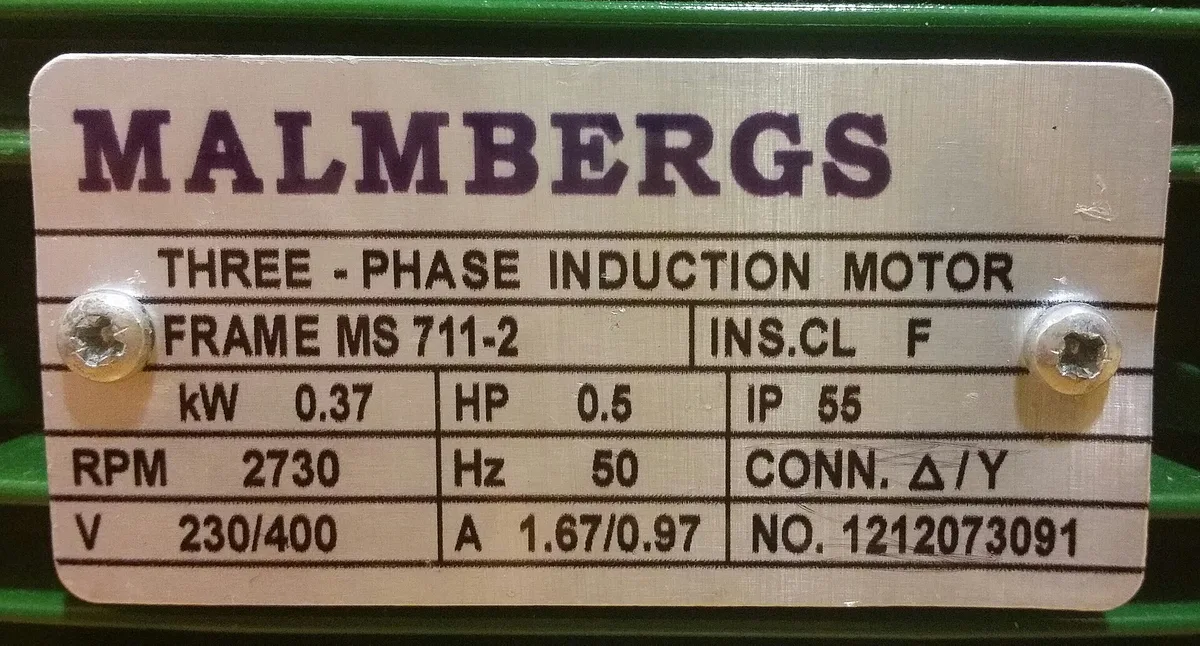
YouRead the equipment plate in the photos on job 1182 and add the details to the asset record.
ClaudeThree-phase induction motor, Malmbergs. Frame MS 711-2, 0.37 kW (0.5 HP), 2730 RPM, 230/400 V, 1.67/0.97 A, 50 Hz, insulation class F, IP 55, delta/star. Serial 1212073091. I've added it to the asset and noted the serial on the job.
Nobody retyped that off a phone screen three days later. The information was already sitting on the job, in a format software couldn’t read.
The same thing works for anything with numbers or fine print on it:

Five things people are using it for already:
- Read the plate. Model, serial, capacity, install date, straight onto the job and the asset record.
- Read the meter. Before-and-after reads, a pressure gauge, a multimeter display.
- Triage before anyone drives out. “What’s wrong here?” as a first pass on the photos the customer sent in.
- Check the work was finished. Was the site left clean, is the valve fitted, does the finished shot match the before shot.
- Catch a mismatch. The photos show a 250 L unit and the quote is priced for a 170 L one.
It doesn’t cost you a fortune in AI credits
There’s a catch with photos and AI, and it’s the reason nobody does this well. A photo off a phone is enormous — the ones we tested ran up to 12.7 MB — and AI models charge by how much you send them. Feed five raw site photos into a conversation and you’ve spent a serious chunk of it before anyone asks a question. (Protecting that budget is a running theme here; it’s also why we keep 50-plus connectors out of your context window.)
So FloConnector handles that part for you. Photos come out of ServiceM8, through us, and reach your AI 97% smaller — while staying sharp enough that a serial number is still legible. That balance is the whole trick, and it’s why we don’t squeeze them harder than we do: crush a photo far enough and you destroy the small print that was the reason you opened it.
That’s one real call, five photos off a single job, measured end to end:
| Photo on the job | What your AI receives | Saved |
|---|---|---|
| 12.72 MB | 399 KB | 96.9% |
| 8.89 MB | 44 KB | 99.5% |
| 2.44 MB | 62 KB | 97.4% |
| 945 KB | 60 KB | 93.6% |
| 1.59 MB | 152 KB | 90.4% |
| 26.6 MB | 718 KB | 97.3% |
You don’t have to do anything to get this. It’s how the connector works.
Five things you can ask for now
Each of these needs several parts of ServiceM8 working together. Every one of them was out of reach before.
1. Did we actually make money on this job?
- Pull the job, its quote and its status
- Read the job activities to get labour hours actually recorded
- Read the materials billed against the estimate
- Read the payments against the invoice
- Give me the margin, and flag any job where labour ran over quote by more than 20%
This is the one that started the rebuild. ServiceM8 has no timesheet report — hours live inside job activities, and reading them was simply not possible before.
Because your workspace can hold more than one platform, the same question can cross the boundary: connect Xero or QuickBooks alongside it and “what did we quote, what did we bill, and did it get paid” becomes one question instead of three tabs.
2. Turn a site photo into job data
- Open the photos on the job
- Read the make, model and serial off the plate
- Write them into the job description
- Attach them to the customer’s asset record so they’re there next visit
3. Quote it from the photos, then send it
- Look at the photos and tell me what the job needs
- Add the right pre-priced bundle of parts and labour to the job
- Generate the quote PDF
- Email it to the customer with the PDF attached
4. Catch compliance gaps before you invoice
- List last week’s completed jobs
- Check each one for a completed safety form and checklist
- Show me the ones that went out the door without it
5. Chase tomorrow’s schedule
- Show me tomorrow’s bookings and who’s allocated to each
- Flag any unallocated job
- Send the customer reminders using our standard SMS template
(SMS sends use your own ServiceM8 SMS credits, and messages over 153 characters use more than one.)
What we won’t let it do
More capability is only good if it can’t hurt you. Some things are one ambiguous sentence away from a very bad afternoon, so we made the deliberate call to leave them out of the AI’s reach entirely, even though the API allows them:
- Deleting a customer. It hides their entire job history. Irreversible.
- Adding or removing staff. Adding one consumes a licence seat — a real change to your bill — and emails an invitation to a real person. Removing one revokes someone’s access on the spot.
- Changing tax rates. They’re account-wide, they’re owned by your accounting package, and a wrong one quietly poisons every invoice after it.
- Deleting attachments. Photos and signed documents are evidence. There is no good reason for an AI to be able to remove them.
- Registering webhooks. Being able to point your data at an arbitrary web address isn’t a feature we’re comfortable handing to a chat window.
Everything destructive that is available — voiding a job, removing a line item — sits behind the same confirmation your AI client gives you for any write. You see it before it happens. And your ServiceM8 login never goes near the AI: we hold the connection, the model only ever gets to ask. That’s how the credentials work across every connector we run.
We also ran the whole catalog against a live account before release and deleted 23 tools, because they either didn’t work or weren’t worth the risk. A tool that looks like it worked and quietly did nothing is worse than no tool at all — you’d never know to check.
One honest limitation: ServiceM8’s API doesn’t allow connected apps to upload attachments, so your AI can read photos and documents but can’t add new ones. Generated quotes and invoices can still be filed against the job. If ServiceM8 opens that up, we’ll turn it on.
How to connect ServiceM8 to Claude
ServiceM8 is live in FloConnector now, and it takes about a minute:
- Create a FloConnector workspace and open the ServiceM8 connector
- Click connect and approve the access in ServiceM8
- Copy your endpoint into Claude as a custom connector
- Ask it something — “show me this week’s jobs” is a good first test
If you already had ServiceM8 connected, reconnect it. It runs on our own ServiceM8 app now, so the old connection doesn’t carry over.
Common questions
Do I need to be technical to set this up? No. It’s an approve-and-paste flow, the same as connecting any app to another. See the rest of the connector catalogue for what else plugs in.
Does it work with ChatGPT as well as Claude? Your ServiceM8 MCP endpoint is a standard connector, so it works with any client that supports them. If you’re new to the term, we wrote a plain-English explainer.
What does it cost? ServiceM8 is included on every plan — see pricing. New accounts get free credits to try it.
Can it touch anything I don’t want it to? You choose which platforms are connected, and the destructive operations above are off the table entirely. Field-service businesses running lean tend to start narrow; there’s more on that on our small business page.
Is this an official ServiceM8 add-on? No. FloConnector is an independent connector built on ServiceM8’s public API. ServiceM8 is a trademark of its owner.
167 tools. And an AI that can finally see what your techs photographed.
Illustrative photos: Wikimedia Commons (public domain / CC0). They’re stand-ins for the kind of photo already sitting on your jobs.
Keep reading
More from the blog
Connecting someone else's accounts to Claude, without their password
Every guide to MCP authentication assumes the person connecting the account is the person running the AI client. When you are doing the work for somebody else, they are not. This is the thing I could never solve properly in n8n, and what it took to solve it here.
The FloConnector connector: 14 tools, and one deliberate difference
We build connectors to other people's platforms. This one points at ours: fourteen tools that let your AI client write, revise and publish the skills your workspace runs on. It is an ordinary catalog row in every respect but one, and that one is the interesting part.
Skills over MCP: where your instructions should actually live
An Agent Skill is a folder on somebody's laptop. Fine for one person, a quiet disaster for a team: four copies, three of them stale, no history and no way to take one back. Here is what changes when the folder becomes a hosted object served down the same connection as your tools.